Polygons from detections: fixing invalid shapes and measuring how round or long they are
Why a polygon made from model output can be invalid, how to fix it without losing area, and four simple numbers (eccentricity, circularity, solidity, vertex count) that describe its shape.
When you turn a segmentation or detection model’s output into map polygons, a few shapes always come out broken: the outline crosses itself, and GIS tools refuse it. And once the polygons are valid, you often want to filter them by shape, for example to drop long thin slivers from a class that should be round. These are my notes on both steps with Shapely. Getting the polygons out of a mask in the first place is in instance masks to polygons, sorting out overlapping neighbours is in overlapping polygons with an STRtree, and how area itself is computed is in the shoelace formula.
What makes a polygon invalid
A polygon is valid when its outer ring is closed, doesn’t cross itself, and any holes sit inside it without touching each other in more than single points. The most common problem is a self-intersection. The vertices themselves are fine, but they’re listed in the wrong order, so the ring folds over itself like a bow tie.
import numpy as np
from shapely.geometry import Polygon

vs = np.array([[-54.76, -102.86], [-51.95, -79.22], [5.17, -97.27],
               [-14.65, -114.13], [1.47, -110.38], [-3.14, -93.98]])
bad = Polygon(vs)
print(bad.is_valid)   # False: the ring crosses itself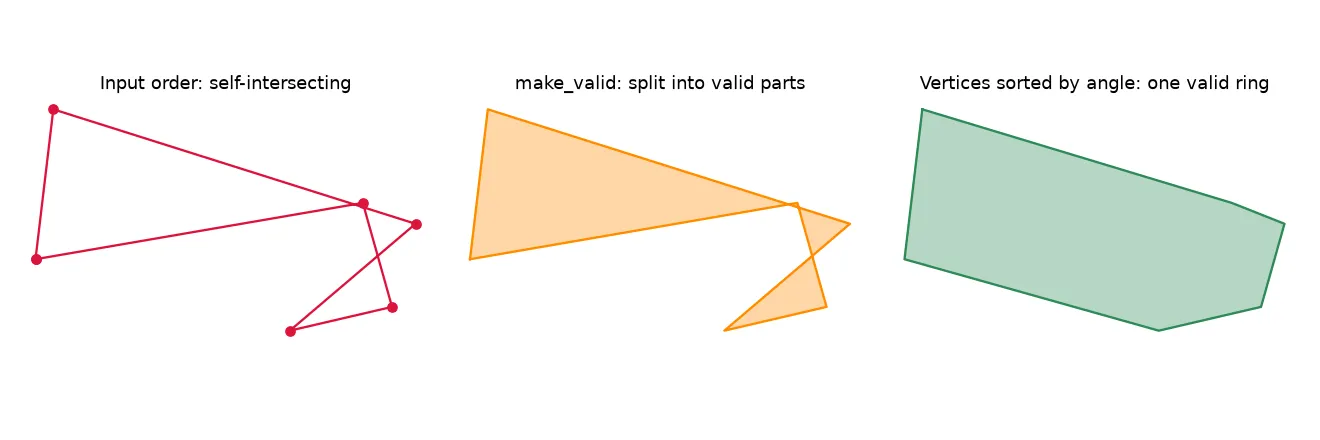
Three ways to “fix” it, and what each one really does
1. buffer(0). The classic trick. It rebuilds the geometry and often gives you something valid, but it can quietly throw away part of the area. On the shape above it keeps about 610 square units.
2. make_valid. The safer choice. It keeps every bit of the original area and returns valid pieces, here a MultiPolygon of about 680 square units. Use it when you can’t afford to lose area, and then decide what to do with the pieces (keep the biggest, or keep them all).
3. Re-ordering the vertices. If you know the points belong to one simple outline and only their order is wrong, sort them by angle around their centre:
c = vs.mean(axis=0)
order = np.argsort(-np.arctan2(vs[:, 1] - c[1], vs[:, 0] - c[0]))
good = Polygon(vs[order])
print(good.is_valid)  # True
This only works for star-shaped polygons, meaning shapes where the centre can “see” every vertex. For shapes like an L or a U, sorting by angle makes a different, wrong outline. So use it for compact blobs, not as a general fix.
Something I mixed up at first: shapely.ops.orient does not repair a polygon. It only sets the direction of the ring (counter-clockwise for the outside), which some file formats expect. A self-intersecting polygon is still invalid after orient.
Four numbers that describe a shape
Once the polygons are valid, a few cheap measures tell you a lot about their shape.
Eccentricity measures how stretched out the shape is. Take the smallest rotated rectangle around it, with long side and short side :
It’s 0 when the bounding rectangle is a square and close to 1 for a long, thin one. This is really the ellipse eccentricity formula applied to the bounding rectangle, so it’s only an approximation, but it’s fast and simple.
Circularity (the Polsby–Popper score) compares the area with the perimeter :
A perfect circle scores 1. Jagged or stretched outlines have a long perimeter for their area, so they score lower.
Solidity is the area divided by the area of the convex hull (the shape you’d get by stretching a rubber band around it). It’s 1 for convex shapes and drops for shapes with dents or arms, like an L.
Vertex count is a rough measure of how detailed or noisy an outline is. It’s handy for spotting jagged, over-segmented results before you simplify them.
def eccentricity(g):
    r = g.minimum_rotated_rectangle
    x, y = r.exterior.coords.xy
    b, a = sorted([np.hypot(x[1]-x[0], y[1]-y[0]), np.hypot(x[2]-x[1], y[2]-y[1])])
    return float(np.sqrt(1 - (b / a) ** 2)) if a > 0 else 0.0

circularity = lambda g: 4 * np.pi * g.area / g.length ** 2
solidity    = lambda g: g.area / g.convex_hull.area
Here’s what they give for a few simple shapes:
| Shape | Eccentricity | Circularity | Solidity |
|---|---|---|---|
| Circle | 0.00 | 1.00 | 1.00 |
| Square | 0.00 | 0.79 | 1.00 |
| Rectangle 6 × 1 | 0.99 | 0.38 | 1.00 |
| L-shape (3 × 3, arms 1 wide) | 0.00 | 0.44 | 0.71 |
The measures fill in each other’s gaps. The L-shape fits in a square bounding rectangle, so its eccentricity is 0, but solidity and circularity show that it isn’t compact.
Using them in practice
With GeoPandas, compute the metrics as columns, then look at how they’re spread out per class before picking thresholds:
import geopandas as gpd
gdf = gpd.read_file("predictions.gpkg")
gdf["geometry"] = gdf.geometry.make_valid()
gdf["eccentricity"] = gdf.geometry.apply(eccentricity)
gdf["circularity"]  = gdf.geometry.apply(circularity)
gdf["solidity"]     = gdf.geometry.apply(solidity)
Things that are naturally round, like tree crowns seen from above, should have low eccentricity and high solidity. A crown polygon with eccentricity above 0.95 (short side less than a third of the long side) is suspicious, and is often an artefact like two crowns merged into a strip. Things that are naturally long, like fallen trunks, need their own thresholds, so filter per class rather than across everything.
Key takeaways
- Invalid polygons usually come from vertex order, not from bad coordinates.
- Use
make_validrather thanbuffer(0)when area matters.orientdoesn’t repair anything. - Sorting vertices by angle only fixes star-shaped outlines.
- Eccentricity, circularity, solidity and vertex count are cheap, and together they describe how stretched, compact and dented a shape is.
- Set shape thresholds per class, after looking at the distributions.
Resources
- Shapely documentation:
make_valid,orient,minimum_rotated_rectangle. - Open Geospatial Consortium, Simple Features Access (OGC 06-103r4): the formal rules for valid polygons.
- Polsby, D. & Popper, R. (1991), The Third Criterion: Compactness as a Procedural Safeguard Against Partisan Gerrymandering, Yale Law & Policy Review: origin of the circularity score.