From instance masks to polygons: contours, morphology and the usual pitfalls
The usual tools for turning a raster instance mask into vector polygons (contours, morphology, fragments, overlaps, simplification, map coordinates), and the easy mistakes that come with each.
A segmentation model gives you pixels, but a GIS wants polygons. Getting from one to the other takes a small set of standard tools: contour tracing, morphological operators, connected-component labelling and line simplification. Each one is simple on its own, and each one has its own way of quietly going wrong. I kept tripping over these, so here I go through them one at a time on a synthetic mask, with the options and trade-offs for each. Fixing invalid polygons and measuring their shape is in polygon validity and shape metrics.
Contours: from a binary mask to rings
An instance mask stores one integer per pixel: 0 for background and for object . For each object you take the binary mask lab == k and trace around its border. OpenCV’s findContours uses the border-following algorithm of Suzuki and Abe. skimage.measure.find_contours (marching squares, sub-pixel) and rasterio.features.shapes (exact pixel edges) are common alternatives. In OpenCV, two flags matter:
- Retrieval mode.
RETR_EXTERNALonly returns outer borders, so holes disappear.RETR_CCOMPreturns outer borders and holes in a two-level hierarchy, so you can rebuild polygons with holes. - Approximation.
CHAIN_APPROX_NONEkeeps every border pixel.CHAIN_APPROX_SIMPLEonly keeps the ends of straight runs. Same shape, fewer vertices.
import numpy as np, cv2
from shapely.geometry import Polygon

def mask_to_polygons(mask):
    """Binary mask -> list of shapely Polygons with holes, in pixel coordinates (x=col, y=row)."""
    contours, hier = cv2.findContours(mask.astype(np.uint8), cv2.RETR_CCOMP,
                                      cv2.CHAIN_APPROX_SIMPLE)
    polys = []
    if hier is None:
        return polys
    for i, (nxt, prv, child, parent) in enumerate(hier[0]):
        if parent != -1 or len(contours[i]) < 3:   # skip holes and degenerate pieces
            continue
        holes, j = [], child
        while j != -1:                              # walk the list of this outer ring's holes
            if len(contours[j]) >= 3:
                holes.append(contours[j][:, 0, :])
            j = hier[0][j][0]
        polys.append(Polygon(contours[i][:, 0, :], holes))
    return polys
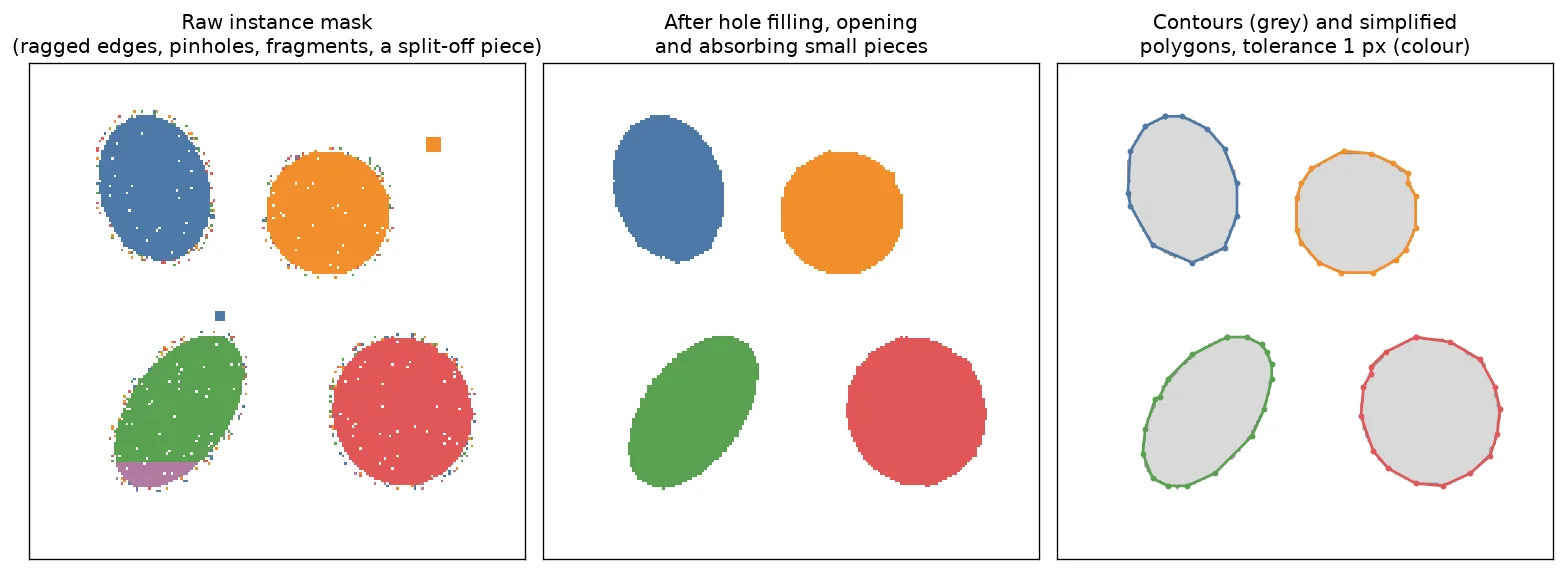
On the raw mask in the figure, this gives up to four parts per object and dozens of one-pixel holes. Most of the results are invalid, because tiny holes touch the outer ring or each other. Noise in the raster turns into broken geometry in the vector. That’s why masks usually get cleaned before they’re traced.
Two details I wish I’d known earlier. One object can give several outer contours, so you have to decide whether an object is a MultiPolygon or just its biggest part. And OpenCV contours run through pixel centres, so the polygon comes out about half a pixel smaller than the pixels it covers. For a 2,077-pixel object the polygon area is 2,001 px². polygon.buffer(0.5, join_style="mitre") brings it back to about 2,089. For small objects, that half pixel is a big share of the area.
Morphology: four operators and two traps
Mathematical morphology means poking at a binary image with a small shape called the structuring element (or kernel):
- Erosion keeps a pixel only if the whole kernel around it fits inside the object. It shrinks the object, removes thin spikes and cuts thin bridges.
- Dilation adds every pixel the kernel touches. It grows the object and fills small gaps.
- Opening is erosion followed by dilation, with the same kernel, the same number of times. It removes anything smaller than the kernel and leaves bigger things about the same size.
- Closing is dilation followed by erosion. It fills holes and notches smaller than the kernel.
Trap 1: unequal steps. Eroding more times than you dilate isn’t an opening. It’s an opening plus extra erosion, so every object comes out smaller. In the figure below, two erosions and one dilation leave only about half of the object.
Trap 2: holes inside the object. This one tripped me up. Erosion also grows every hole. With lots of pinholes, the growing holes meet and eat away the inside, and the dilation afterwards can’t bring it back. Filling holes first (scipy.ndimage.binary_fill_holes), or doing a closing before the opening, avoids this:
from scipy.ndimage import binary_fill_holes

K = cv2.getStructuringElement(cv2.MORPH_ELLIPSE, (5, 5))       # round kernel
m = (lab == 3).astype(np.uint8)
opened = cv2.morphologyEx(m, cv2.MORPH_OPEN, K, iterations=2)  # erode 2x, then dilate 2x
filled = binary_fill_holes(m).astype(np.uint8)
opened_filled = cv2.morphologyEx(filled, cv2.MORPH_OPEN, K, iterations=2)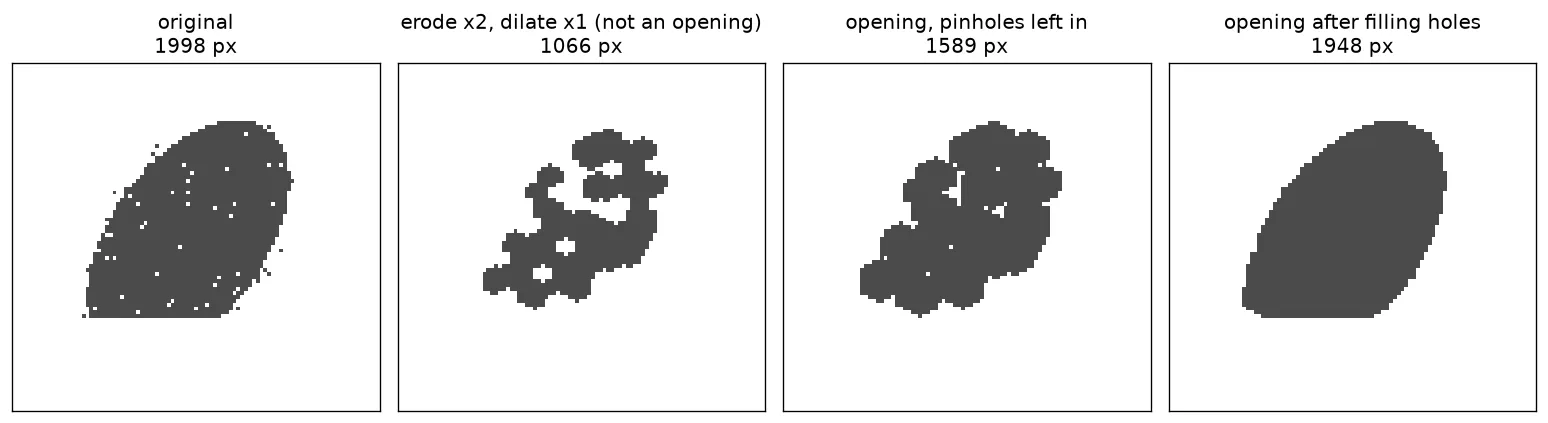
A round kernel (MORPH_ELLIPSE) treats all directions the same. A square kernel slowly turns round objects into octagons. A median filter (cv2.medianBlur, odd kernel size) is another common way to smooth the edges of binary masks. The right kernel size depends on the pixel size and the smallest detail you need to keep, so there’s no single magic number.
Several labels in one image. If you dilate each label separately and paste the results back into one image, the result depends on the loop order: where two objects grow into each other, whichever is written last wins. skimage.segmentation.expand_labels(labels, distance) grows every label only into background and stops where labels meet.
Fragments: one object in several pieces
Even after cleaning, an object can still be made of several separate pieces. Or a model can split one object into a big instance and a small one (the purple tip in the first figure). skimage.measure.label finds the connected pieces and regionprops gives their areas. The common options are:
- Drop pieces below a minimum area. Simple, but it deletes real small objects and loses area.
- Keep only the biggest piece per object. You get one polygon per object; stray parts disappear.
- Keep all pieces as a
MultiPolygon. Nothing is lost, but a lot of tools expect simple polygons. - Absorb a small piece into the neighbouring object it shares the longest border with. Keeps the area, but can glue a real small object onto a big one.
The last option needs a bit of code. The one-pixel ring around a piece is the set of pixels it touches, and bincount counts how many of them belong to each neighbour:
from skimage.measure import label, regionprops

def absorb_small_pieces(lab, min_area):
    out, changed = lab.copy(), True
    while changed:                                    # each merge lowers the number of pieces,
        changed = False                               # so the loop always ends
        for inst in np.unique(out)[1:]:
            comps = label(out == inst)
            for r in regionprops(comps):
                if r.area >= min_area:
                    continue
                piece = comps == r.label
                ring = (cv2.dilate(piece.astype(np.uint8), np.ones((3, 3), np.uint8)) > 0) & ~piece
                neigh = out[ring]
                neigh = neigh[(neigh != 0) & (neigh != inst)]
                out[piece] = np.bincount(neigh).argmax() if neigh.size else 0
                changed = True
    return out
The loop repeats because absorbing one piece can change what its neighbours look like. A threshold like min_area depends on the objects and the pixel size, so you have to pick it per dataset.
Overlapping masks: who owns a pixel?
Models that output one binary mask per instance (Mask R-CNN and its relatives) can give the same pixel to two objects. Before tracing, the usual choices are:
- Highest score wins. Paint masks from lowest to highest confidence, so the most confident one is written last. It’s the same as a per-pixel argmax over scores.
- Remove duplicates first. If two masks overlap a lot (high IoU, intersection over union), they’re probably the same object, and mask non-maximum suppression keeps just one.
- Sort it out later in vector space, where the overlap can be split geometrically. See overlap handling with a spatial index.
owner = np.zeros(masks[0].shape, np.int32)
for i in np.argsort(scores):          # lowest score first ...
    owner[masks[i]] = i + 1           # ... the most confident mask is painted last and wins
Simplifying, and getting to map coordinates
Contours follow the pixel staircase, so they have lots of vertices that don’t carry any real information. Douglas–Peucker simplification removes every vertex that sits within some tolerance of the simplified line. cv2.approxPolyDP and Shapely’s simplify both do this.
from shapely import affinity
from shapely.ops import unary_union

s = p.simplify(1.0, preserve_topology=True)   # p from mask_to_polygons: ~90 -> under 20 vertices

# pixel (col, row) -> map (x, y) for a north-up raster whose top-left corner is (x0, y0)
x0, y0, px = 500000.0, 6400000.0, 0.05
s_map = affinity.affine_transform(s, [px, 0, 0, -px, x0 + px / 2, y0 - px / 2])

# one outline around nearby parts: a "closing" in vector space
merged = unary_union([g.buffer(1.5, join_style="mitre") for g in parts]).buffer(-1.5, join_style="mitre")
A tolerance of about one pixel gets rid of the staircase without cutting real corners. Here the area changes by less than 0.5 %. preserve_topology=True stops the result from crossing itself. But simplifying each polygon on its own does not keep shared borders shared, so neighbours can end up with thin gaps or overlaps. Topology-aware tools (for example TopoJSON-style simplification or GRASS v.generalize) avoid that.
The affine step flips the y axis (rows go down, northings go up) and adds half a pixel, because the contour vertices sit at pixel centres. The last line answers a question that comes up a lot: unary_union of separate polygons gives a MultiPolygon, not one outline. Taking its first part (.geoms[0] in Shapely 2; plain indexing doesn’t work anymore) just throws the others away. Buffering out, merging, and buffering back in by the same distance bridges gaps narrower than twice that distance and gives one polygon. It’s basically a morphological closing, but for vectors.
Key takeaways
RETR_CCOMPkeeps holes. One object can give several contours, so decide how to handle them.- An opening erodes and dilates the same number of times. Holes grow during erosion, so fill them first.
- Dilating labels one by one into a shared image depends on the order.
expand_labelsdoesn’t. - Fragments can be dropped, kept, cut down to the biggest piece or absorbed into a neighbour. Each choice trades area against wrong merges.
- Simplify with a tolerance of about one pixel, and remember the half-pixel offset when georeferencing.
Resources
- OpenCV documentation: Contours in OpenCV (including contour hierarchy) and Morphological Transformations.
- scikit-image documentation:
measure.labelandregionprops,segmentation.expand_labels. - SciPy documentation:
ndimage.binary_fill_holes. - Shapely documentation:
simplify,buffer,affine_transform. - Suzuki, S. & Abe, K. (1985). Topological structural analysis of digitized binary images by border following. Computer Vision, Graphics, and Image Processing, 30(1), 32–46. The algorithm behind
findContours. - Douglas, D. H. & Peucker, T. K. (1973). Algorithms for the reduction of the number of points required to represent a digitized line or its caricature. Cartographica, 10(2), 112–122.
- Serra, J. (1982). Image Analysis and Mathematical Morphology. Academic Press. The classic reference for erosion, dilation, opening and closing.
- He, K., Gkioxari, G., Dollár, P. & Girshick, R. (2017). Mask R-CNN. ICCV. Per-instance masks with confidence scores.