Relief displacement: why tall objects lean outward in aerial photos
Why the top of a tree or building shows up farther from the image centre than its base, how d = r·h/H comes out of similar triangles, how to measure height with it, and what it means for trees and buildings in drone photos.
Look at any drone photo of a forest or a town and you’ll notice that trees and buildings near the edges seem to fall away from the centre. You see their sides, and their tops sit farther out than their bases. This is called relief displacement. It’s not a lens fault, and you can’t calibrate it away. It comes straight from the way the camera projects the scene through one point, and it’s the reason a raw photo can’t be used as a map. The nice part is that the same effect is useful: how much something leans tells you how tall it is. Here I work through the classic formula and what it means in practice.
Where the lean comes from
In a vertical photo, every ray goes through the lens, which sits at height above the ground, right above the nadir point. (For the camera geometry and each pixel’s viewing angle, see nadir and off-nadir viewing.)
Take a tree of height standing at horizontal distance from the nadir point. Its base and its top have the same horizontal position, but the top is metres closer to the camera. Each point is imaged at a scale equal to the focal length over its own distance below the lens:
Since , the top lands farther from the image centre than the base. Both points sit on the same line through the nadir point, so the shift is radial: everything leans straight away from the nadir point, like the spokes of a wheel. That picture helped me a lot.
The formula
The displacement in the image is . Plug in and simplify, and you get the textbook relation:
where
- is the relief displacement in the image (from the base to the top),
- is the radial distance in the image from the nadir point to the displaced point (the top),
- is the height of the object above its base,
- is the flying height above the base of the object.
and have to be in the same image unit (millimetres on the sensor, or pixels). and have to be in the same ground unit (metres). The formula is a ratio, so it doesn’t matter which units you pick, as long as you don’t mix them. It’s the same rule that trips people up when working out viewing angles from pixel offsets and heights in metres.
Three things follow straight from it:
- At the nadir point () there’s no displacement. A tree right under the drone shows only its top.
- Displacement grows in a straight line with distance from the centre and with object height.
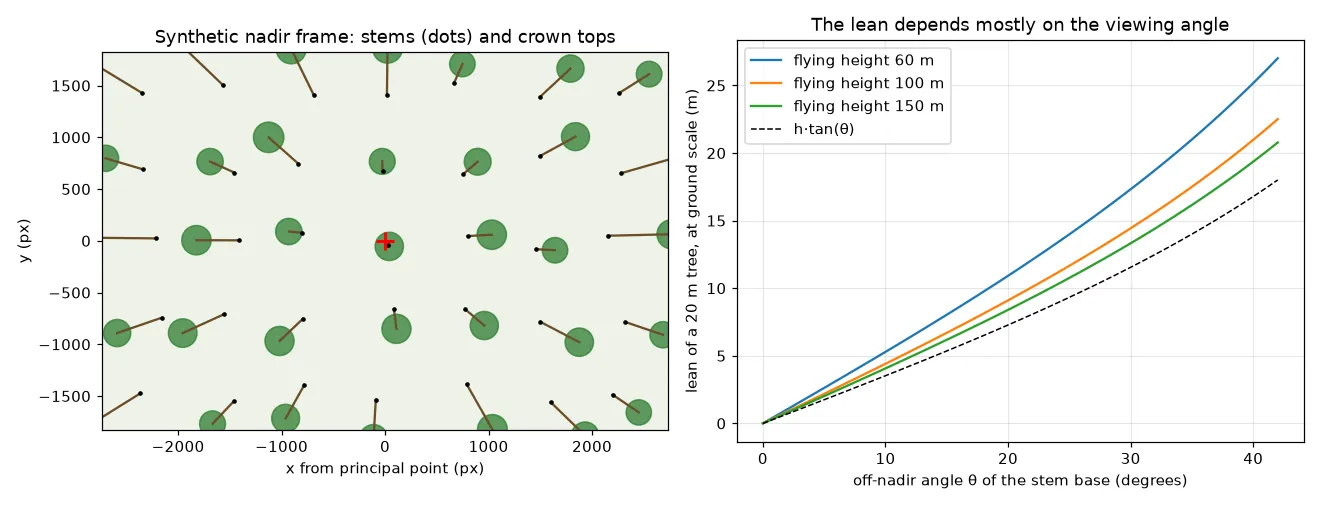
- Flying higher reduces it, but only for a fixed spot on the ground. This one surprised me. At a fixed spot in the frame (a fixed off-nadir angle ), the lean measured at ground scale is , which barely depends on once . A wide-angle lens flown high still sees the same tilted view at its edges. What really cuts the lean is a narrower field of view (a longer lens), or only using the central part of each photo.
Measuring height from the lean
Flip the formula around and you get the height:
The code below projects a synthetic 22 m tree with a straight-down camera and gets its height back from the image:
import numpy as np
f_px, H = 3648.0, 100.0          # focal length (px), flying height above the ground (m)

def project(X, Y, Z):
    """Nadir camera at (0, 0, H): ground metres -> image pixels from the centre."""
    s = f_px / (H - Z)           # scale at elevation Z
    return X * s, Y * s

xb, yb = project(45.0, 20.0, 0.0)     # stem base
xt, yt = project(45.0, 20.0, 22.0)    # tree top
r_base, r_top = np.hypot(xb, yb), np.hypot(xt, yt)
d = r_top - r_base                    # 507 px
h = d * H / r_top                     # 22.00 m
The base is 1796 px from the centre and the top is at 2303 px, so the tree shows up 507 px long, about 14 m at ground scale. One pixel of error in changes the height by cm here, but a lot more for objects near the centre, where is small. The method works for buildings, poles and lone trees where you can see both the base and the top. In a closed forest the stem base is usually hidden, which is why tree heights normally come from a surface model built from stereo overlap or from LiDAR (see airborne LiDAR: DTM, DSM and CHM). Stereo parallax is actually the two-photo version of the same idea.
What this means for trees and buildings in drone photos
- Crowns aren’t above their stems in the image. At 37° off nadir and 100 m above the ground, a 20 m tree’s top is shifted about 19 m at ground scale. If you mark tree positions on a raw photo and put them on a map with a single scale, you’re off by at least the tree height times .
- Things look different across the frame. Near the centre you see the top of a crown. Near the edge you see its side, and its outline is stretched in the radial direction. A detector or measurement that assumes a top-down view will act differently at the edges than in the middle.
- Tall things hide what’s behind them. A leaning crown or building covers the ground on its far side (as seen from the nadir point). Small trees next to tall ones can disappear at the edge of one frame and show up in the next photo.
- Use the right nadir point. For a tilted photo, the displacement is radial from the true nadir point, the point straight below the lens, not from the image centre. A few degrees of gimbal tilt moves that point by hundreds of pixels.
- Terrain counts too. is the height above the object’s base, so a tree on a ridge, closer to the drone, leans more than the same tree in a valley at the same spot in the image.
Relief displacement is also exactly what an orthophoto is supposed to remove. Removing it for the ground is easy if you have a terrain model. Removing it for trees and buildings is much harder, as explained in orthorectification and true orthophotos.
Key takeaways
- Tall objects lean radially away from the nadir point, because their tops are closer to the camera and imaged at a bigger scale.
- : displacement grows with radial distance and object height and shrinks with flying height. Keep image units and ground units separate.
- At a fixed off-nadir angle, the lean at ground scale is close to , so the viewing angle matters much more than the flying height.
- Turning the formula around, , gives heights when both the base and the top are visible.
Resources
- P. R. Wolf, B. A. DeWitt, B. E. Wilkinson, Elements of Photogrammetry with Applications in GIS, 4th ed., McGraw-Hill, 2014, chapter 6 (vertical photographs: relief displacement and heights from displacement).
- T. M. Lillesand, R. W. Kiefer, J. W. Chipman, Remote Sensing and Image Interpretation, 7th ed., Wiley, 2015, chapter 3 (relief displacement of vertical features).
- J. C. McGlone (ed.), Manual of Photogrammetry, 6th ed., ASPRS, 2013.