Airborne LiDAR basics: returns, classes, ground filtering and DTM, DSM and CHM
What's inside an airborne LiDAR point cloud, how the ground points get found, and how to make the DTM, DSM and canopy height model without pits and holes.
An airborne laser scanner sits in a plane or drone, fires hundreds of thousands of laser pulses per second, and times how long each echo takes to come back. What you get is a cloud of millions of 3D points over the ground, buildings and trees. Most people never look at the points themselves. They use three rasters made from them: the bare ground (DTM), the top surface (DSM), and the difference between the two, which in a forest is the canopy height model (CHM). These are my notes on what’s in a LiDAR file, how the ground points get picked out, and how to build the three rasters without the usual glitches. All the examples use a synthetic 60 m × 60 m forest tile.
What one pulse records
The first thing I had to unlearn: a laser pulse isn’t a thin line. When it hits the canopy, its footprint is a few centimetres to a few decimetres wide. Part of the beam hits a leaf and bounces back. The rest keeps going through gaps and may bounce off a branch, and finally off the ground. Each echo the sensor picks up is called a return, and every return becomes a point with:
- Return number and number of returns: “2 of 3” means the second of three echoes from one pulse. First returns describe the top surface. Last returns are your best chance of hitting the ground. A “1 of 1” return from open ground looks exactly like a “1 of 1” from a solid roof.
- Intensity: how strong the echo was. It depends on the material, but also on range, angle and how the footprint got split between returns. So you need to normalise it before comparing it across flights.
- Classification: a code per point. The ASPRS LAS standard fixes the main ones: 1 unclassified, 2 ground, 3/4/5 low/medium/high vegetation, 6 building, 7 low noise, 9 water, 18 high noise. National datasets usually come with at least ground and noise already classified.
- Scan angle, GPS time, flight line and, in newer formats, colour and near-infrared.
One detail that’s easy to trip over: coordinates in LAS/LAZ files are stored as scaled integers, , where is the stored integer, the scale (such as 0.01 m) and an offset from the header. Library readers give you the real value. The raw integers are only handy for compact processing, and mixing the two up is a classic bug.
A good first step on any tile is to throw away what clearly isn’t surface: noise classes 7 and 18, points flagged as withheld, and points way below the terrain. Lots of tools can do this filtering while reading the file.
Finding the ground
If the ground isn’t classified yet, you have to do it yourself. All ground filters rest on the same simple idea: the terrain is the lowest surface, and it’s smooth compared with the things standing on it. The classic families are:
- Progressive morphological filters (Zhang et al., 2003). Take the lowest point in each cell. Then apply a morphological opening (erosion, then dilation) with a window that grows step by step. Anything narrower than the window disappears. A point counts as non-ground if it sits more than some height threshold above the opened surface. The threshold grows with the window size, so real slopes don’t get flattened.
- Progressive TIN densification (Axelsson, 2000). Start with a few seed points that are almost surely ground, like the lowest point in big cells. Build a triangulated surface (a TIN, triangulated irregular network) through them. Then add points that are close enough to the nearest triangle and make small enough angles with its corners. Repeat until no more points pass. Many commercial tools use this method.
- Cloth simulation filter (Zhang et al., 2016). This one I like because it’s so easy to picture. Flip the cloud upside down and drop a simulated cloth on it. A stiff cloth rests on the (upside-down) terrain without sagging into the “holes” left by trees and buildings. Points close to the cloth are ground. Cloth stiffness is the main setting, and it roughly decides how steep a slope can be.
All three juggle the same two mistakes. Too strict, and ridges and cliff edges get cut off. Too loose, and low bushes and car roofs end up in the terrain.
DTM, DSM and CHM
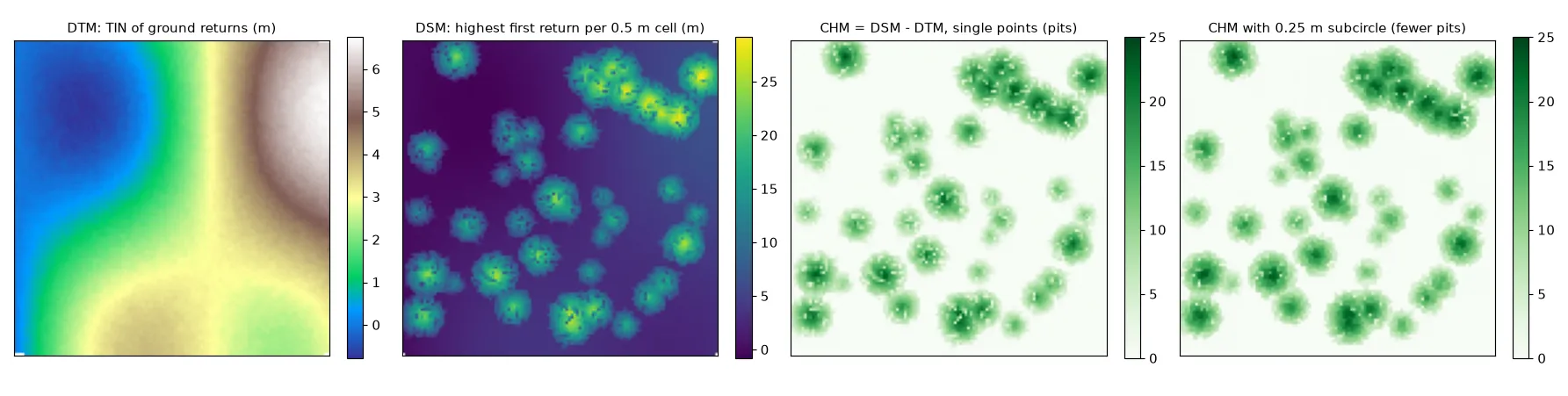
DTM (digital terrain model). Interpolate the ground points onto a grid. Triangulation (TIN) with linear interpolation is the usual choice. Inverse distance weighting and kriging work too. Under thick canopy there aren’t many ground points, so the DTM there is really a guess across gaps of several metres. In my synthetic tile, with 40% of canopy pulses reaching the ground, the TIN error was about 3 cm.
DSM (digital surface model). For each cell, keep the highest first return. It’s a z-buffer seen from above, the same rule as in projecting point clouds to images:
import numpy as np

def p2r_max(x, y, z, res, x0, y_top, shape, subcircle=0.0):
    """Highest z per cell. With subcircle > 0, each point is replaced by
    8 points on a small circle, so it can fill neighbouring cells."""
    if subcircle > 0:
        a = np.arange(8) * np.pi / 4
        x = (x[:, None] + subcircle * np.cos(a)).ravel()
        y = (y[:, None] + subcircle * np.sin(a)).ravel()
        z = np.repeat(z, 8)
    col = np.floor((x - x0) / res).astype(int)
    row = np.floor((y_top - y) / res).astype(int)        # north up
    ok = (col >= 0) & (col < shape[1]) & (row >= 0) & (row < shape[0])
    out = np.full(shape, -np.inf)
    np.maximum.at(out, (row[ok], col[ok]), z[ok])        # keep the maximum per cell
    out[np.isinf(out)] = np.nan                          # empty cells
    return out
CHM (canopy height model) is : so basically, how tall whatever stands on the ground is. Another way to get the same thing is to normalise the points first, subtracting the terrain height under each point (), and then take the highest normalised point per cell. Normalised points are also what you need for per-plot height stats like height percentiles or canopy cover. (How those heights turn into forest numbers is in forest structure from above.)
Do the same subtraction over a city and you get a normalised DSM (nDSM) of the buildings.
Pits, holes and the subcircle trick
Two glitches show up when the cell size is close to the spacing between points.
Empty cells. With about 4 pulses per m² and 0.5 m cells, the average cell gets one first return, so lots of cells get none. In my tile, 37% of DSM cells were empty before interpolation.
Pits. Some first returns slip through a gap in the crown and come from deep inside the tree. If that’s the only point in its cell, the cell shows a hole several metres deep right in the middle of a tree. Pits mess up tree-top detection and crown segmentation, because those look for local maxima and smooth crown shapes.
The subcircle trick (lidR has it as an option for its point-to-raster method) swaps each return for a small ring of points with radius . Now every return can reach the neighbouring cells too, and since the maximum wins, the high returns cover up the low ones. On the synthetic tile:
| subcircle radius | empty DSM cells | pit cells inside crowns |
|---|---|---|
| 0 (single points) | 37% | 20% |
| 0.15 m | 9% | 11% |
| 0.25 m | 3% | 7% |
The catch is that every crown grows by about in all directions, so keep below roughly half a cell. Other fixes are a median or closing filter on the CHM, or the pit-free algorithm of Khosravipour et al. (2014). That one builds several CHMs from first returns above higher and higher height thresholds, removes long triangle edges, and takes the maximum of all of them. Whatever you pick, fill the leftover empty cells by interpolation, for example with a TIN. Don’t just leave them as zeros.
Picking the cell size
Choose the cell size from the point density. Each cell should get several first returns on average. So for a density of points/m², a cell side of at least m is a sensible start (about 0.9 m at 4 points/m², 0.25 m at 50 points/m²). Bigger cells don’t need any tricks but blur single crowns. Smaller cells need subcircles or pit filling.
Key takeaways
- Every return has a return number, number of returns, intensity and a class. First returns show the top surface, last returns are the best shot at the ground.
- Ground filters assume the terrain is the lowest smooth surface. The usual families are morphological, TIN densification and cloth simulation.
- DTM is interpolated ground, DSM is the highest return per cell, and CHM = DSM − DTM (or the highest height-normalised return per cell).
- Cells smaller than the point spacing give empty cells and pits. Subcircles, filters or pit-free CHMs fix that, at the cost of slightly wider crowns.
Resources
- ASPRS, LAS Specification 1.4 R15: point record fields, return numbers and standard classes.
- J.-R. Roussel, T. Goodbody, P. Tompalski, The lidR package, chapters on ground classification, DTM, CHM (including the subcircle option and pit-free CHM) and height normalisation.
- P. Axelsson, “Generating DEM from LIDAR data with progressive TIN densification”, International Archives of Photogrammetry and Remote Sensing, 33(B4), 2000.
- K. Zhang et al., “A progressive morphological filter for removing nonground measurements from airborne LIDAR data”, IEEE Transactions on Geoscience and Remote Sensing, 41(4), 2003.
- W. Zhang et al., “An easy-to-use airborne LiDAR data filtering method based on cloth simulation”, Remote Sensing, 8(6), 2016.
- A. Khosravipour et al., “Generating pit-free canopy height models from airborne lidar”, Photogrammetric Engineering & Remote Sensing, 80(9), 2014.