Projecting point clouds to images: top-down rasters, spherical panoramas and the z-buffer
How to turn a 3D point cloud into a 2D image, either looking straight down or as a 360° panorama, how to decide which point gets each pixel, and how to pick the pixel size.
There are tons of tools for images: 2D convolutions, pretrained networks, fast viewers, simple file formats. For point clouds there are far fewer. So a common trick is to project the cloud onto an image, do the work in 2D, and then carry the results back to the points. Two projections cover most cases. An orthographic one looks straight down, like a map (people call it a “bird’s-eye view”). A spherical one looks out in every direction from one spot, like a panorama, which is also how a spinning LiDAR naturally sees the world. Both run into the same question: when several points land in one pixel, which one do you keep? I coded both while following Chapter 4 of 3D Data Science with Python. Here’s how they work, plus two bugs I had in my first versions.
Looking straight down (orthographic)
An orthographic projection just drops one coordinate. For a top-down view you drop and lay a regular grid with cell size (metres per pixel) over and :
The row uses because image rows count downwards while northing (the coordinate on a map) goes up. Forget this and your map comes out upside down. The image size is by .
Distances and areas stay the same everywhere: one pixel is always metres. That’s why this view is behind every GIS raster made from LiDAR (elevation models, canopy height models, intensity images), and behind the “BEV” input that many 3D object detectors for driving use.
Looking all around (spherical)
A spherical projection puts the viewer at a centre and records the direction to each point. Shift the cloud so is the origin, then convert to spherical coordinates:
Here is the distance from the centre. is the azimuth, the angle as you turn around the vertical axis. is the polar angle, measured down from straight up. (My first version said was a rotation around the axis. That’s wrong: with atan2(y, x) it’s a rotation around .) Then map the two angles straight onto an image of height and width :
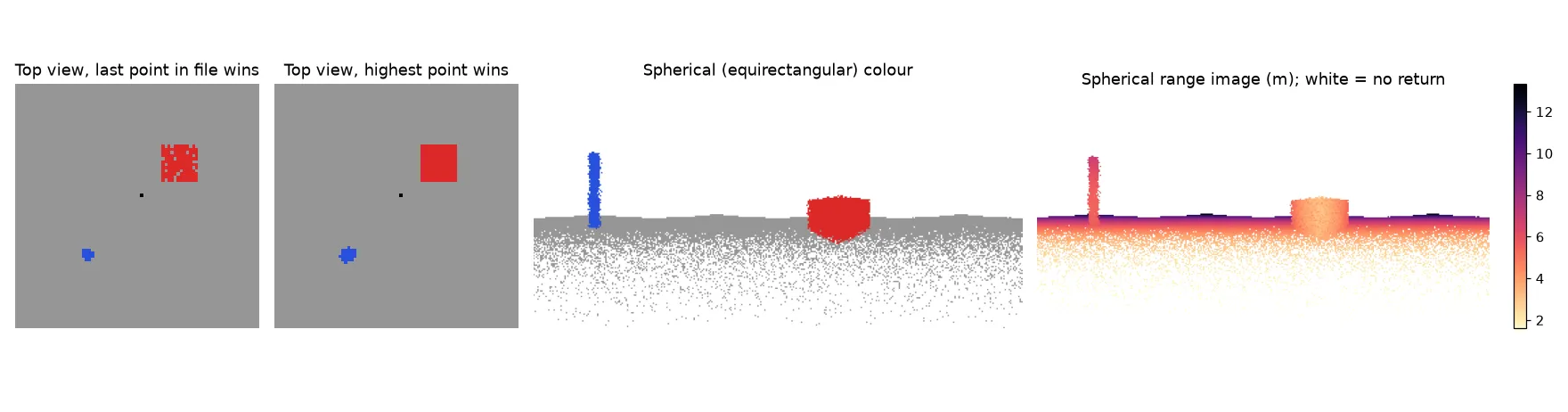
The width is twice the height because azimuth covers and the polar angle covers , so each pixel spans the same angle both ways. This is the equirectangular format used for 360° photos. If you store in each pixel instead of colour, you get a range image.
The thing to keep in mind: here a pixel is an angle, not a length. A pixel covers more ground the farther away it looks, so nearby surfaces get lots of points and distant ones get few. Above the horizon there’s often nothing at all.
A spinning LiDAR fits this projection really well. Its lasers sit at fixed, known elevation angles, so if you use one image row per laser and one column per firing step, almost every measurement gets its own pixel and very few collide. In practice you also squeeze the rows to the sensor’s vertical field of view (often only a few tens of degrees) instead of the full to , or most rows stay empty. Networks like SqueezeSeg and RangeNet++ segment LiDAR scans in this form and then copy the labels back to the points.
Which point gets the pixel: the z-buffer
Lots of points fall into the same pixel. Which one you want depends on the view:
- Top view: keep the highest point, because that’s what you’d see from above. (For a terrain model you’d keep the lowest ground point instead.)
- Spherical view: keep the nearest point, because it hides everything behind it.
This is called a z-buffer in computer graphics. My first top-view code just looped over the points and wrote each one into its pixel, so whichever point came last in the file won. LAS files are usually stored in the order they were captured, not by height, so wherever ground and roof points share a pixel, the result is basically random. You can see it in the figure: the shuffled-order version has grey ground speckled through the red box. In 144 box pixels, 20 showed the wrong colour.
A vectorised z-buffer fixes the bug and gets rid of the slow Python loop. Sort the points by pixel, then by whatever you want to minimise, and keep the first point in each pixel:
import numpy as np

def zbuffer(pixel_id, key, n_pixels):
    """Index of the point with the smallest key in each pixel (-1 if empty)."""
    order = np.lexsort((key, pixel_id))               # sort by pixel, then by key
    first = np.unique(pixel_id[order], return_index=True)[1]
    winner = np.full(n_pixels, -1)
    winner[pixel_id[order][first]] = order[first]
    return winner

def ortho_top(points, res):
    xmin, ymax = points[:, 0].min(), points[:, 1].max()
    col = ((points[:, 0] - xmin) / res).astype(int)
    row = ((ymax - points[:, 1]) / res).astype(int)   # rows grow downwards
    H, W = row.max() + 1, col.max() + 1
    return zbuffer(row * W + col, -points[:, 2], H * W).reshape(H, W)  # highest wins

def spherical(points, center, H=180):
    p = points - center
    r = np.linalg.norm(p, axis=1)
    theta = np.arctan2(p[:, 1], p[:, 0])                # azimuth around z
    phi = np.arccos(np.clip(p[:, 2] / r, -1, 1))        # polar angle from +z
    W = 2 * H
    u = np.minimum(((theta + np.pi) / (2 * np.pi) * W).astype(int), W - 1)
    v = np.minimum((phi / np.pi * H).astype(int), H - 1)
    return zbuffer(v * W + u, r, H * W).reshape(H, W), r  # nearest wins
It’s handy to return the index of the winning point, not just its colour. Then you can fill any channel (colour, height, intensity, class) from the same lookup, and after running a 2D model you can send each pixel’s prediction back to its point. Points that lost the z-buffer test don’t have a pixel, so they need a second step, like a nearest-neighbour vote in 3D, to get a label.
Picking the pixel size
The pixel size is a trade-off between holes and lost detail.
- If is smaller than the point spacing, lots of pixels stay empty. You can fill them by interpolation, morphological closing, or by “splatting” each point onto a small disc instead of a single pixel.
- If is much bigger, many points fight over each pixel, and thin things, like the pole in the figure, shrink to a few pixels.
For a top view, a good starting point is a pixel size close to the average point spacing, which is about for a density in points per square metre. For a spherical image, match the scanner’s angular resolution, or the angle between neighbouring points at the distance you care about.
What you lose
Every projection throws away one dimension. The top view loses everything under the highest surface. You can keep some of it by storing several channels per pixel (minimum height, maximum height, point count). The spherical view loses everything behind the nearest surface, and it depends on where you put the centre. For example, a spherical image from the middle of an airborne tile is a valid picture but a weird one, because the data were never captured from there. For a real perspective camera with intrinsics and a pose, see the camera extrinsic matrix. For ways to store 3D data without dropping a dimension, see representing 3D data.
Key takeaways
- A top-down (orthographic) projection keeps real distances. Use for rows so north is up.
- A spherical projection maps azimuth and polar angle onto a grid. It’s the natural image of a spinning LiDAR.
- When points land in the same pixel, choose on purpose: highest point for a top view, nearest point for a panorama. Writing them in file order gives random results.
- Keep the winning point’s index per pixel so results can go back to 3D.
- Pick the pixel size from the point spacing, and expect some holes.
Resources
- Florent Poux, 3D Data Science with Python (O’Reilly, 2025), Chapter 4, sections on orthographic and spherical projections. My code-along followed the chapter; the vectorised z-buffer is my own rewrite.
- B. Wu, A. Wan, X. Yue, K. Keutzer, “SqueezeSeg”, ICRA 2018 (range-image segmentation of LiDAR).
- A. Milioto, I. Vizzo, J. Behley, C. Stachniss, “RangeNet++”, IROS 2019 (spherical projection and back-projection of labels).
- X. Chen, H. Ma, J. Wan, B. Li, T. Xia, “Multi-View 3D Object Detection Network for Autonomous Driving”, CVPR 2017 (bird’s-eye-view and front-view projections of LiDAR).