Orthorectification and true orthophotos: why buildings and trees still lean in an orthomosaic
How an aerial photo gets turned into a map-like orthophoto using an elevation model, why a terrain model leaves tall things leaning, and how a surface model, a visibility check and overlapping photos give a true orthophoto.
A drone photo is a perspective view: scale changes with elevation, and tall things lean away from the centre (see relief displacement). A map needs the opposite, an orthographic view, where every point is seen from straight above and sits at its true map position. An orthophoto is a photo resampled into that view, and an orthomosaic is a lot of them stitched together. The part I found interesting is that “orthorectified” doesn’t always mean “every object is in the right place”. It depends on which elevation model was used and how the photos were combined.
The basic idea: go from the map to the photo
Orthorectification works backwards, like any good image warp (see forward versus inverse warping). You start with an empty map grid. Then for each grid cell:
- Take its map coordinates .
- Look up its elevation in an elevation model.
- Project the 3D point into the photo with the camera model (the collinearity equations, which just say the point, the lens and its image lie on one straight line).
- Read the colour at that spot in the image and write it into the cell.
The camera model needs the interior orientation (focal length, principal point, lens distortion) and the exterior orientation (position and rotation, see the camera extrinsic matrix). In drone software these come from the bundle adjustment of the whole flight. The only new ingredient is step 2, and the rest of this note is really about that.
import numpy as np

def orthorectify(img, zbuf, cam, X, Y, Z, check_visibility=False):
    """For each ground cell (X, Y) with surface height Z, fetch its colour from a nadir photo."""
    d = cam[2] - Z                                         # depth below the camera
    u = np.round(N/2 + F*(X - cam[0])/d).astype(int)      # project the 3D point into the photo
    v = np.round(N/2 - F*(Y - cam[1])/d).astype(int)
    inside = (u >= 0) & (u < N) & (v >= 0) & (v < N)
    out = np.full(X.shape + (3,), np.nan)
    out[inside] = img[v[inside], u[inside]]
    if check_visibility:                                    # is something closer to the camera?
        hidden = np.zeros(X.shape, bool)
        hidden[inside] = d[inside] > zbuf[v[inside], u[inside]] + 0.5
        out[hidden] = np.nan                                # occluded: no valid colour here
    return out
Here F and N are the focal length in pixels and the image size, and zbuf is the depth of the nearest surface each photo pixel sees (a z-buffer, as in projecting point clouds to images). For a real tilted camera, the two projection lines turn into the full collinearity equations, but the logic doesn’t change.
Which elevation model?
There are two common ones (the LiDAR note explains how both are built):
- A DTM (digital terrain model) is the bare ground, with buildings and trees removed.
- A DSM (digital surface model) is the top surface: roofs, tree crowns, and the ground where nothing covers it.
People use “DEM” loosely for either one, so it’s worth checking which one a product actually used.
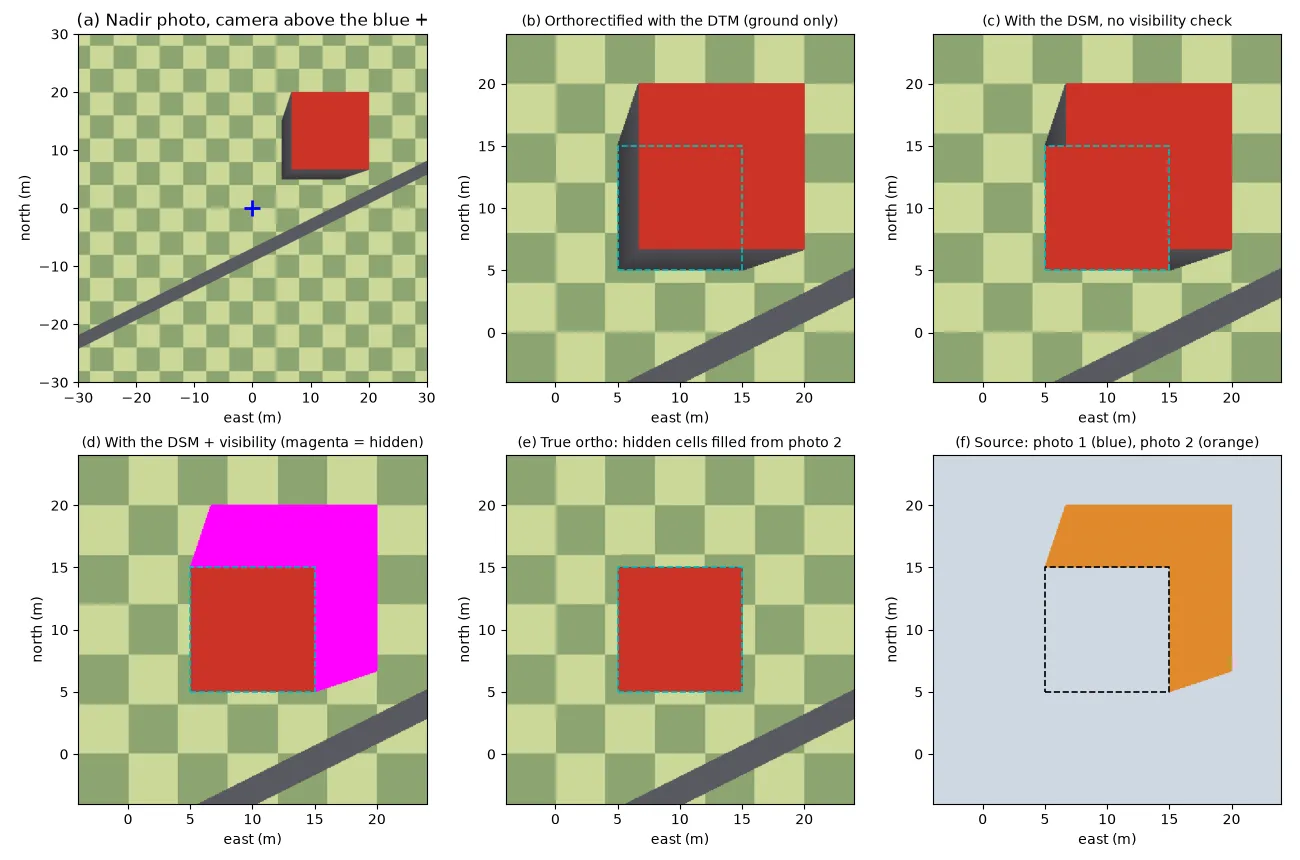
To see the difference, I built a small synthetic scene: a checkerboard ground, a road and a 15 m tall box building, photographed by a straight-down camera 60 m up. The building covers 5 to 15 m east and 5 to 15 m north of the point under the camera. Panel (a) of the figure below is the photo.
Orthorectifying with the DTM (panel b) puts the ground in the right place: the checkerboard and the road line up perfectly. But the roof gets treated as if it were on the ground, so it keeps its relief displacement. It’s shifted away from the nadir point, drawn too big (it was closer to the camera), and two walls are visible. This is the ordinary orthophoto, and it’s why buildings and trees still lean in a lot of orthomosaics. In forests the effect is strong: crowns are shifted away from their stems by roughly the tree height times , where is the off-nadir angle.
Orthorectifying with the DSM (panel c) moves the roof onto its true footprint. But now a new error shows up, and this one confused me at first. Ground cells just behind the building (as seen from the camera) project to photo pixels that actually show the roof or the wall, because the building hides that ground from this camera. So the roof gets copied twice: once in the right place and once as a ghost. This is called double mapping.
True orthophotos: a visibility check plus more photos
The fix comes in two parts.
- Detect what’s hidden. For each cell, compare its distance to the camera with the distance of the nearest surface the photo actually sees at that pixel. If something is closer, the cell is hidden in this photo and gets no colour (panel d, magenta). In my scene, about 118 m² of ground next to the 100 m² building was hidden from the single photo.
- Fill from other photos. With enough overlap, another photo usually sees the hidden ground. In panel (e) a second photo taken from the other side fills every hidden cell, and panel (f) shows which photo each cell came from.
What you get is a true orthophoto: every visible surface, ground and roof, at its correct map position, with no lean. It needs a good DSM, a visibility test per photo and per cell, and lots of overlap, so it’s more expensive and more fragile than an ordinary orthophoto.
Mosaicking: picking a photo for each cell
In a drone survey, every ground cell shows up in several photos. The mosaicking step decides which photo, or which blend of photos, colours each cell. A common, simple rule is to use the photo that sees the cell closest to straight down, because that’s where lean, hiding and view-angle effects are smallest:
def most_nadir_photo(X, Y, Z, cams):
    """Index of the photo that sees each ground cell closest to straight down."""
    tan_theta = [np.hypot(X - cx, Y - cy) / (cz - Z) for cx, cy, cz in cams]
    return np.argmin(np.stack(tan_theta), axis=0)
For photos taken at the same height over flat ground, this splits the area into Voronoi-like cells around the nadir points, and each photo only gives its central part. More overlap means the nadir points are closer together, so the off-nadir angles that end up in the mosaic are smaller, and so is the leftover lean. Better software also moves the seamlines (the borders between photos) so they run over flat ground instead of cutting through buildings or tree crowns, and blends the colours across them.
Why forests are the hard case
Drone tools like OpenDroneMap and Pix4D rebuild the surface from the same photos and project the photos onto it. For buildings, a photogrammetric DSM is good enough for near-true orthos. For forests it isn’t. Thin branches, gaps between crowns and leaves moving in the wind give a noisy surface full of holes, and crown edges are exactly where matching fails most. Orthorectifying onto that surface smears or tears the crown edges, while orthorectifying onto a smooth terrain model leaves the crowns leaning. So in practice, forest orthomosaics are a compromise: smooth surfaces, plus lots of overlap and closest-to-nadir selection, so that most of each crown comes from a photo that sees it from almost straight above. When the positions of single trees matter, it’s safer to measure them in the DSM or canopy height model than in the orthomosaic.
Key takeaways
- Orthorectification maps each ground cell back into a photo, through the camera model and an elevation model.
- With a DTM, the ground is right but buildings and trees keep their relief displacement and still lean.
- With a DSM, raised surfaces move to their true positions, but you have to detect hidden ground, or it gets ghost copies (double mapping).
- A true orthophoto needs a DSM, a visibility check and overlapping photos to fill the hidden parts.
- Picking, for each cell, the photo that sees it closest to straight down, and putting seamlines over flat ground, keeps the leftover lean small.
Resources
- P. R. Wolf, B. A. DeWitt, B. E. Wilkinson, Elements of Photogrammetry with Applications in GIS, 4th ed., McGraw-Hill, 2014: collinearity equations and the production of orthophotos.
- J. C. McGlone (ed.), Manual of Photogrammetry, 6th ed., ASPRS, 2013: orthorectification, true orthophotos and mosaicking.
- T. M. Lillesand, R. W. Kiefer, J. W. Chipman, Remote Sensing and Image Interpretation, 7th ed., Wiley, 2015, chapter 3: orthophotos.
- OpenDroneMap, documentation: the DSM, DTM and orthophoto outputs and their options.
- Pix4D, support knowledge base: DSM and orthomosaic generation.