Photometric colour augmentation: brightness, gamma, hue shifts and Fancy PCA
What each common colour augmentation does to the pixels, how to use them on image-mask pairs, and when changing colours helps a model or quietly wrecks the signal it needs.
If you train a model on images from one camera, one season and one time of day, it learns that lighting as if it were part of the task. Give it a darker, warmer or more washed-out image at test time and accuracy drops, even though the objects are the same. Photometric augmentation fights this: during training you change pixel values but leave pixel positions alone. I went through the usual set of colour augmentations with a segmentation model in mind, and wrote down what each one actually does to the pixels and when it’s a good idea. All the examples use a small synthetic scene.
Changing colours versus moving pixels
Augmentations come in two families:
- Geometric: flips, 90° rotations, crops, scaling, elastic or grid distortion. These move pixels around, so the label has to move with them. (What rotations and flips can and can’t teach a CNN is in the rotation and geometric augmentation note.)
- Photometric: brightness, contrast, gamma, hue, saturation, colour jitter, PCA colour noise, blur, sharpening, noise. These change pixel values where they are. The label stays put.
This split matters most for dense tasks like segmentation (one label per pixel). I come back to that below.
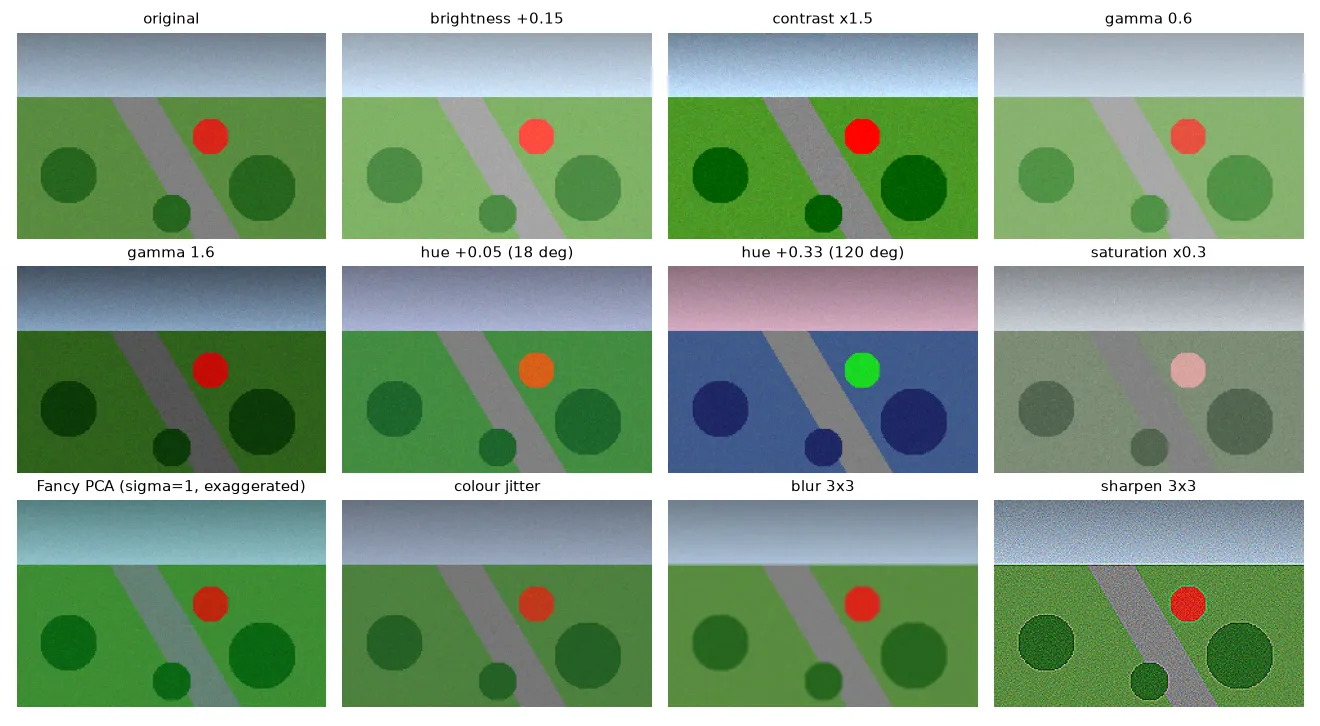
Brightness, contrast and gamma
With the image scaled to , the simplest way to fake an exposure change is a straight line:
where is the mean intensity, is the contrast factor (it stretches values away from the mean) and is a brightness offset. The result gets clipped back to , so big values of or blow out the highlights and you lose information.
Gamma is a curve instead: . Black (0) and white (1) stay where they are. With the mid-tones get darker; with they get brighter. It’s a better imitation of a different camera response or exposure than a plain offset, because no pixel gets pushed out of range. (Watch out: libraries don’t agree on the direction. Some apply , so check which way “gamma 1.5” goes in yours.)
import numpy as np

def brightness_contrast(img, alpha, beta):
    """alpha scales contrast around the mean, beta shifts brightness. img in [0, 1]."""
    mean = img.mean()
    return np.clip(alpha * (img - mean) + mean + beta, 0, 1)

def gamma(img, g):
    """g > 1 darkens mid-tones, g < 1 brightens them; 0 and 1 stay fixed."""
    return img ** g
Hue, saturation and value
In RGB, brightness and colour are mixed into every channel. HSV pulls them apart: hue is the colour’s angle on a circle (red at 0°, green at 120°, blue at 240°), saturation is how far the colour is from grey, and value is the largest of R, G and B. The colour spaces note goes into these in more detail.
Since hue is an angle, a hue shift is really a rotation, and it has to wrap around: hue becomes , not . Saturation and value just get scaled and clipped.
def hsv_shift(img, dh, s_scale, v_scale):
    hsv = rgb_to_hsv(img)                            # hue in [0, 1) = full circle
    hsv[..., 0] = (hsv[..., 0] + dh) % 1.0           # rotate hue, wrap around
    hsv[..., 1] = np.clip(hsv[..., 1] * s_scale, 0, 1)
    hsv[..., 2] = np.clip(hsv[..., 2] * v_scale, 0, 1)
return hsv_to_rgb(hsv)(rgb_to_hsv and hsv_to_rgb are the standard formulas; every library has them.) You can see two things in the figure. A shift of 0.05 (18°) just warms the scene a little. A shift of 0.33 (120°) turns the grass blue and the red disc green, which no camera would ever do. And grey pixels, like the road, don’t change at all. That surprised me until I realised a grey pixel has zero saturation, so its hue doesn’t really mean anything.
Colour jitter
Colour jitter isn’t a new operation. It picks random brightness, contrast, saturation and hue factors from small ranges and applies the four operations in random order. The order matters a bit because the operations don’t commute: if you clip after a brightness boost, a later contrast step sees different values.
def colour_jitter(img, rng, b=0.2, c=0.2, s=0.2, h=0.03):
    ops = [
        lambda x: brightness_contrast(x, 1, rng.uniform(-b, b)),
        lambda x: brightness_contrast(x, rng.uniform(1 - c, 1 + c), 0),
        lambda x: hsv_shift(x, 0, rng.uniform(1 - s, 1 + s), 1),
        lambda x: hsv_shift(x, rng.uniform(-h, h), 1, 1),
    ]
    for i in rng.permutation(len(ops)):
        img = ops[i](img)
    return img
Fancy PCA
AlexNet came up with a colour augmentation based on how colours usually vary in natural images. Compute the covariance of RGB values over all pixels, and find its eigenvectors and eigenvalues . Then add the same offset to every pixel of the image:
with new drawn for each image. The way I think about it: colours in real photos mostly vary along a few main directions (first something like brightness, then warm versus cool). Shifting along those directions looks natural; shifting along rare directions doesn’t. The original paper computed the covariance once over the whole ImageNet training set. Many libraries compute it per image instead, which is a common variant.
One small catch: is a variance, so multiplying by it mixes up units. Many implementations use , the standard deviation along each axis, which keeps in pixel units. With the effect is hard to see, so the figure uses .
def fancy_pca(img, sigma=0.1, rng=np.random.default_rng()):
    pixels = img.reshape(-1, 3)
    cov = np.cov(pixels - pixels.mean(0), rowvar=False)  # 3x3 RGB covariance
    eigvals, eigvecs = np.linalg.eigh(cov)               # columns are eigenvectors
    alpha = rng.normal(0, sigma, 3)                      # one draw per image
    delta = eigvecs @ (alpha * np.sqrt(eigvals))         # same RGB offset for every pixel
    return np.clip(img + delta, 0, 1)
Blur and sharpening
Blur and sharpening change local contrast, not colour. A box blur looks like slight defocus or motion. A sharpening kernel such as (identity plus a negative Laplacian) looks like the sharpening a camera does by itself, and it also boosts noise, as you can see in the figure. Both help the model care less about how sharp exactly its training camera was. The linear filters note explains these kernels.
Image and mask together
For segmentation, every training sample is an image plus a label mask. The rules are simple:
- Apply geometric transforms to the image and the mask with the same random parameters. When the transform needs interpolation (rotating by any angle, scaling, elastic distortion), use nearest-neighbour for the mask. Bilinear would make up class IDs between two neighbouring classes (like 1.5 between class 1 and class 2).
- Apply photometric transforms to the image only. The mask holds class IDs, not colours.
def augment_pair(img, mask, rng):
    k = rng.integers(4)                         # geometric: same op on both
    img, mask = np.rot90(img, k), np.rot90(mask, k)
    if rng.random() < 0.5:
        img, mask = img[:, ::-1], mask[:, ::-1]
    img = colour_jitter(img, rng)               # photometric: image only
    return img, mask
Libraries like Albumentations handle this for you: you pass image= and mask= together, and pixel-level transforms only touch the image.
When colour augmentation helps, and when it hurts
It helps when the colour differences between training and test data come from things that don’t matter for the task: different cameras and white balance, sun versus clouds, morning versus evening light, haze, or seasons that change the overall tone. In those cases you want the model to learn shapes and textures, and colour noise teaches it not to lean too hard on exact tones.
It hurts when the colour is the label. This is the part I think is easy to miss. If the task is telling healthy green plants from yellowed or red-brown ones, ripe fruit from unripe, or one traffic light from another, a big hue shift turns one class into the other while the label stays the same. So you’re training on wrong labels. For tasks like that:
- keep hue shifts tiny (a few degrees) or switch them off;
- go for brightness, contrast and gamma, which change exposure but keep hue;
- go for Fancy PCA with a small , which follows natural colour variation;
- look at a grid of augmented samples before training: if you can’t tell the classes apart any more, the model can’t either.
A good habit is to treat augmentation strength as a hyperparameter. Compare results with and without colour augmentation on a validation set that really covers the lighting you expect.
Key takeaways
- Photometric augmentations change pixel values, not positions. For segmentation they go on the image only, while geometric ones go on both image and mask (nearest-neighbour for the mask).
- Brightness/contrast is a straight-line change and can clip; gamma is a curve that keeps 0 and 1 fixed.
- Hue is an angle, so hue shifts wrap around, and grey pixels don’t change under a hue shift.
- Fancy PCA adds one colour offset per image along the main directions of RGB variation, so the changes look natural.
- Colour augmentation is great for lighting and camera differences, and harmful when colour itself is what separates the classes.
Resources
- Krizhevsky, Sutskever and Hinton, ImageNet Classification with Deep Convolutional Neural Networks, NeurIPS 2012, Section 4.1 (PCA colour augmentation).
- Shorten and Khoshgoftaar, A survey on Image Data Augmentation for Deep Learning, Journal of Big Data, 2019.
- Albumentations documentation: pixel-level versus spatial-level transforms,
HueSaturationValue,ColorJitter,FancyPCA,RandomGamma. - torchvision transforms v2:
ColorJitter,RandomAdjustSharpness,GaussianBlur. - Related notes: colour spaces for image processing, linear filters and the Gaussian blur.