Linear filters and the Gaussian blur
What a linear shift-invariant filter is, how convolution applies it, and why the Gaussian is the go-to blur kernel.
Blurring, sharpening, edge detection and the first layer of a convolutional network are all the same thing underneath: a linear filter slid across the image. Once I understood one filter properly, the Gaussian, the others got a lot easier. My notebook for this was short (I just plotted Gaussian kernels for lots of widths), so here I fill in the ideas around it, following Chapters 15 and 17 of Foundations of Computer Vision.
Linear and shift-invariant
A filter is just a function that takes an image and gives back an image. Two properties make filters easy to reason about:
- Linear: filtering gives times the filtered plus times the filtered .
- Shift-invariant: if you shift the input, the output shifts by the same amount and nothing else changes. The filter treats every spot in the image the same way.
Any filter with both properties can be written as a convolution with a small array , called the kernel or impulse response:
So basically: each output pixel is a weighted sum of the input pixels around it, using the same weights everywhere. If you feed in a single bright pixel (an impulse), what comes out is the kernel itself. That’s why it’s called the impulse response.
This tripped me up at first: many libraries actually compute correlation, , which is convolution with the kernel flipped. For symmetric kernels like the Gaussian, there’s no difference. For derivative kernels like the sign flips, so check which one your library does (OpenCV’s filter2D and SciPy’s correlate compute correlation; scipy.ndimage.convolve computes convolution).
The box filter and what’s wrong with it
The simplest blur just averages a square neighbourhood: a kernel with every entry . It works, but its frequency response looks like a sinc along each axis. A sinc has side lobes (little bumps on each side), so some high frequencies get through, some of them with their sign flipped. In practice this can leave faint ringing, and it makes the box a poor anti-aliasing filter.
The Gaussian kernel
The 2D Gaussian is
where is the offset from the centre of the kernel and (in pixels) sets the width. The factor makes the continuous kernel add up to 1, so blurring doesn’t change the average brightness. For a sampled kernel we just divide by the sum.
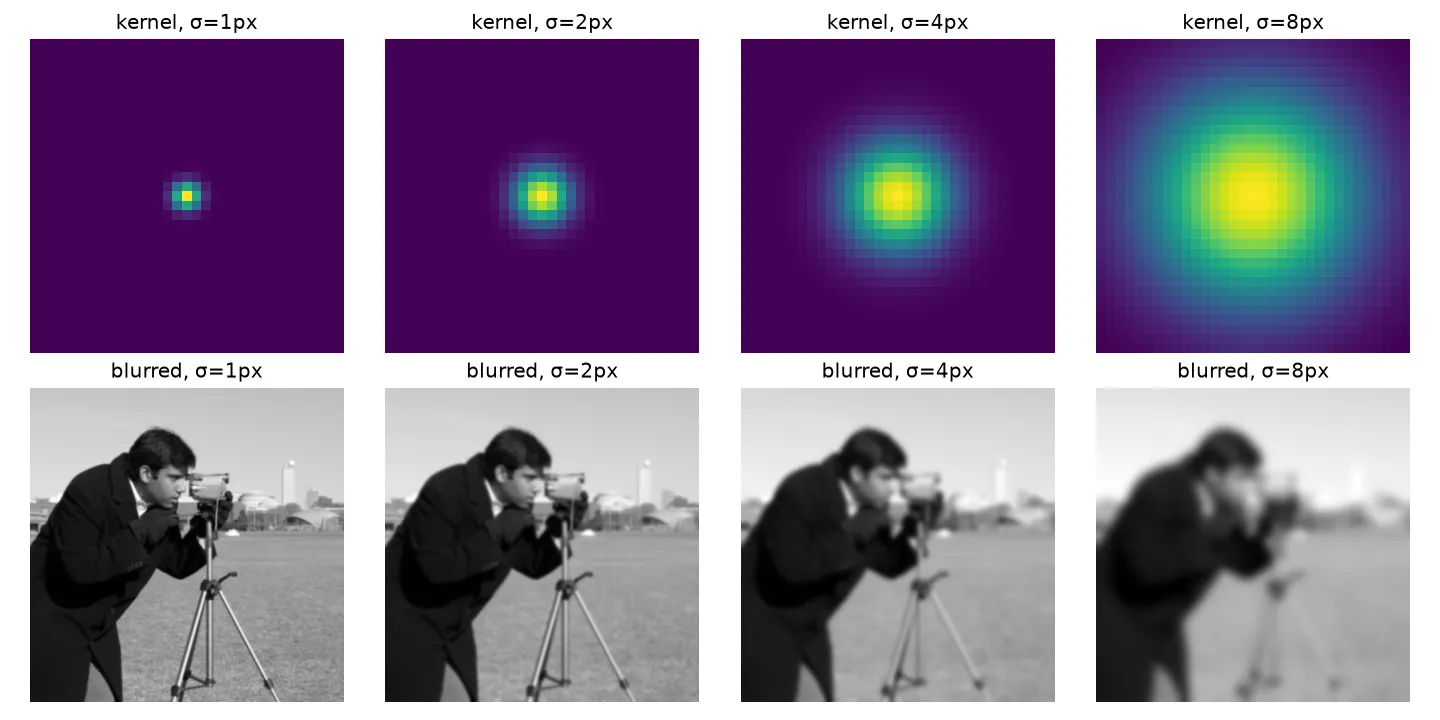
Bigger means a wider kernel and more blur. A handy rule is to make the kernel about wide (three on each side), because the Gaussian is basically zero beyond that.
import numpy as np
from scipy import ndimage as ndi

def gaussian_kernel(sigma):
    r = int(np.ceil(3 * sigma))                # half-width: 3 sigma
    x = np.arange(-r, r + 1)
    g = np.exp(-(x[:, None]**2 + x[None, :]**2) / (2 * sigma**2))
    return g / g.sum()                         # normalise to sum 1

img = np.random.rand(128, 128)
k = gaussian_kernel(2.0)
ours = ndi.convolve(img, k, mode="reflect")
ref = ndi.gaussian_filter(img, 2.0, mode="reflect", truncate=3.0)
print(k.shape, np.abs(ours - ref).max() < 1e-6)   # (13, 13) True
In my original notebook I divided the kernel coordinates by the image size, so was a fraction of the image width instead of a number of pixels. Both work, but pixels are the usual unit and match what library functions expect.
Why the Gaussian is special
It’s separable. , so a 2D blur is just a 1D blur along the rows followed by a 1D blur along the columns. For a kernel of width that’s multiplications per pixel instead of .
Its Fourier transform is also a Gaussian. A Gaussian of width in space has the frequency response
with in radians per pixel. It drops smoothly to zero with no side lobes and never flips sign. Wider in space means narrower in frequency.
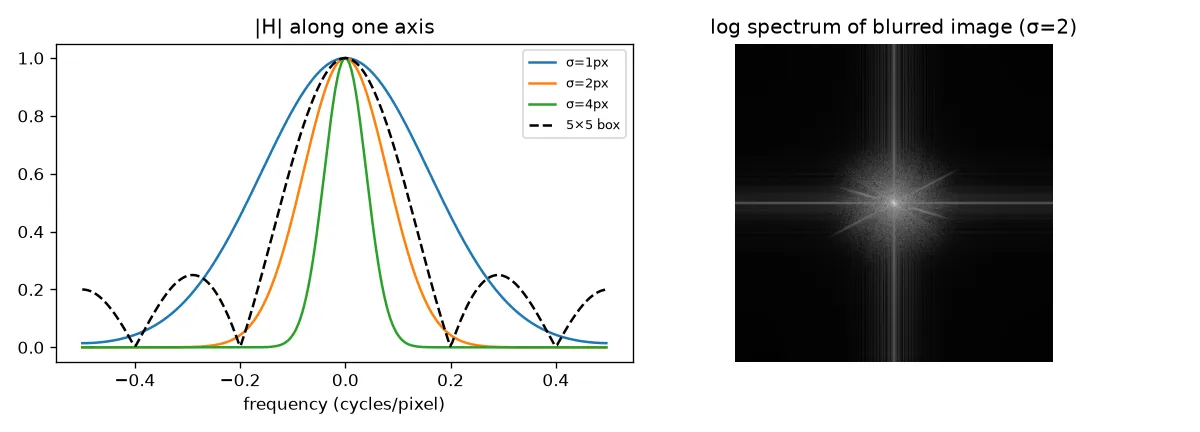
So the Gaussian is a clean low-pass filter (it keeps low frequencies and removes high ones). In the frequency domain, blurring means multiplying the image spectrum by , which shrinks the high frequencies that carry fine detail and edges. This is the convolution theorem: convolution in space is the same as multiplication in frequency (see The discrete Fourier transform of images).
Blurs stack up simply. Blurring with and then with is the same as one blur with . That’s the basis of scale space and image pyramids.
Small binomial kernels are close to it. The kernels and are rows of Pascal’s triangle and look a lot like sampled Gaussians. Their 2D versions are outer products, for example
They’re cheap and are the standard anti-aliasing filters before downsampling (see Sampling and aliasing).
Filtering in the frequency domain
You can also filter by editing the spectrum directly: take the FFT, multiply by a mask, and invert. In my DFT notebook I kept only a block around zero frequency of a tiny image and got a smooth blob back. A hard-edged mask like that is an “ideal” low-pass filter, but its spatial kernel is a sinc, so on real images it causes ringing near edges. A Gaussian mask avoids this, which is one more reason the Gaussian is the default.
Key takeaways
- Linear shift-invariant filters are exactly the convolutions. The kernel is what the filter outputs for a single bright pixel.
- Many libraries compute correlation, which is the same as convolution only for symmetric kernels.
- The Gaussian blur sums to 1, is separable, and is smooth in both space and frequency, so there’s no ringing.
- Bigger means more blur in space and a narrower band of kept frequencies.
- Binomial kernels like are cheap stand-ins for a Gaussian, used before downsampling.
Resources
- Antonio Torralba, Phillip Isola and William T. Freeman, Foundations of Computer Vision, MIT Press, 2024, Chapter 15 “Linear Image Filtering”: https://visionbook.mit.edu/linear_image_filtering.html
- Same book, Chapter 17 “Blur Filters” (box, Gaussian and binomial filters): https://visionbook.mit.edu/blurring_2.html
- SciPy documentation,
scipy.ndimage.gaussian_filter: https://docs.scipy.org/doc/scipy/reference/generated/scipy.ndimage.gaussian_filter.html - Test images in the figures:
cameraandastronautfrom scikit-image’sskimage.data: https://scikit-image.org/docs/stable/api/skimage.data.html