Gabor filters: local frequency and orientation
How multiplying a sinusoid by a Gaussian gives a filter that tells you which frequency and orientation are present at each spot in an image.
The Fourier transform tells you which frequencies an image has, but not where they are. A zebra’s stripes or the joints in a brick wall only repeat in some regions and at some angles. Gabor filters answer the local question: what frequency and orientation is there right here? They’re also a good model of the “simple cells” in the first visual area of the brain (V1), and the first layer of a trained CNN often learns filters that look a lot like them. I played with them in the same notebook as sampling, following Section 22.2 of Foundations of Computer Vision.
A wave under a Gaussian window
A Gabor function is just a sinusoid multiplied by a Gaussian. The sinusoid sets the frequency. The Gaussian keeps the filter to a small patch, so it only “listens” to one region at a time.
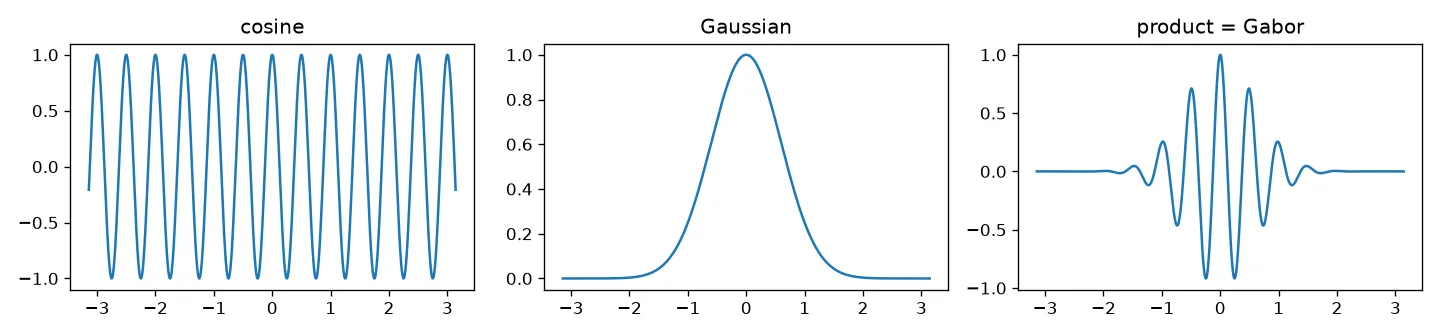
In 2D, with a centre frequency in radians per pixel:
It’s complex. Its real and imaginary parts are the cosine-phase and sine-phase Gabor filters:
Each parameter has a clear job:
- sets the frequency, , and the direction of the stripes. The stripes run at right angles to the vector .
- sets the size of the window. A big means a wide patch in space and a narrow band in frequency. A small means the opposite.
Compact in space and in frequency
The Fourier transform of a Gabor function is a Gaussian centred at with width . So the filter is compact in both domains at the same time. You can’t make a filter as narrow as you like in both (that’s the uncertainty principle of signal processing), but the Gabor function hits the best possible trade-off: it has the smallest product of spread in space and spread in frequency.
The way I picture it, it sits between two extremes. A single pixel (an impulse) is perfectly local in space but contains every frequency. A pure sinusoid is one exact frequency but covers the whole image. With a very large , a set of Gabor filters behaves like the Fourier transform.
One small detail: the cosine-phase Gabor has a small non-zero mean, times the window’s sum, so it reacts a little to plain flat brightness. Either pick big enough compared with the wavelength (at least about one wavelength) or subtract the mean, so it acts as a zero-mean band-pass filter (one that only lets a band of frequencies through).
Quadrature pairs and local amplitude
Convolving an image with gives a complex output that depends on the position and on the filter’s frequency:
The cosine and sine filters form a quadrature pair, which just means they’re out of phase. Their outputs are the real and imaginary parts of , so
is the local amplitude (or energy): how much of that frequency and orientation there is around each pixel, no matter whether the pattern is a thin line or an edge. is the local phase, and that’s what tells you which one it is: a bright line, a dark line, or an edge going one way or the other.
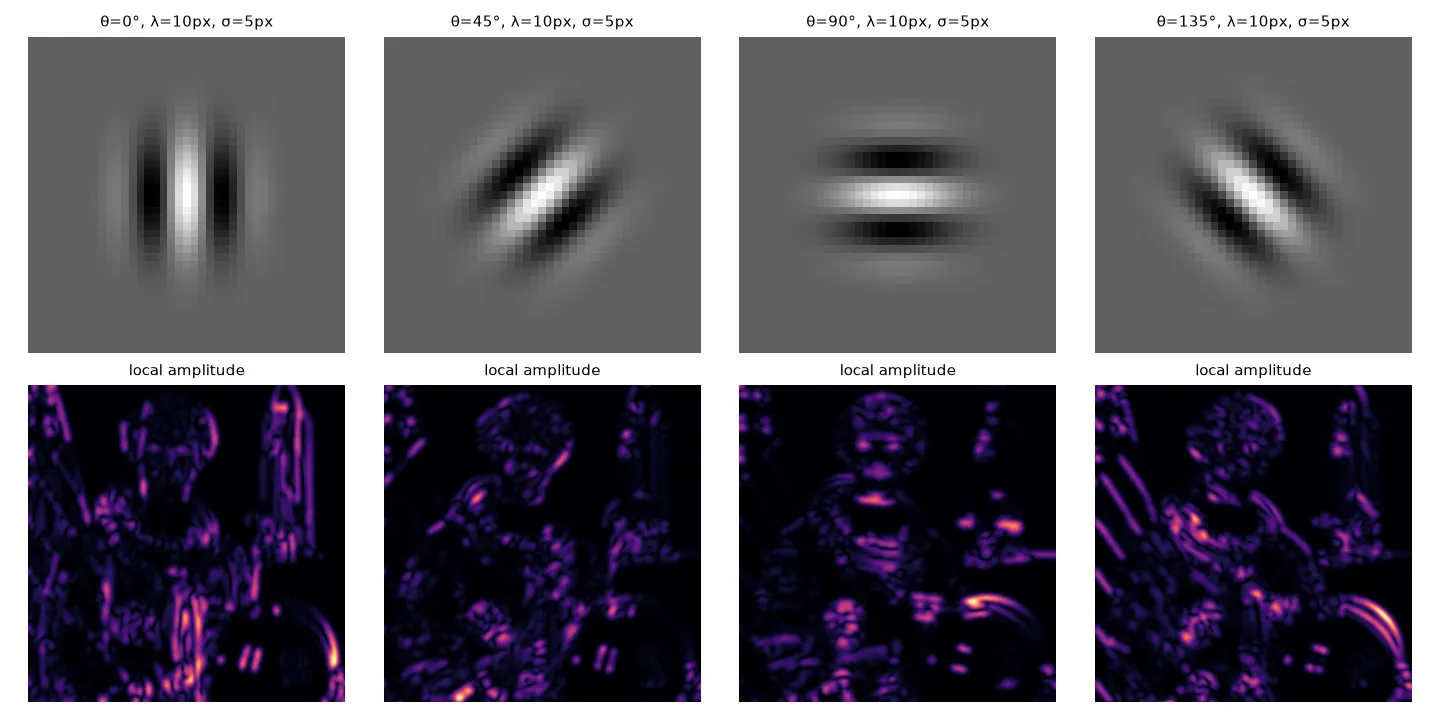
Each orientation lights up different things. A filter with vertical stripes reacts to vertical edges and lines, and one with horizontal stripes reacts to horizontal ones. A set of Gabor filters at several orientations and scales is called a Gabor filter bank, and it’s a classic way to describe texture.
import numpy as np
from scipy import ndimage as ndi

def gabor_pair(sigma, theta, wavelength, size=None):
    """Cosine and sine Gabor kernels; stripes vary along direction theta."""
    r = size // 2 if size else int(3 * sigma)
    y, x = np.mgrid[-r:r + 1, -r:r + 1]
    xr = x * np.cos(theta) + y * np.sin(theta)        # coordinate along theta
    env = np.exp(-(x**2 + y**2) / (2 * sigma**2))
    g_cos = env * np.cos(2 * np.pi * xr / wavelength)
    g_sin = env * np.sin(2 * np.pi * xr / wavelength)
    return g_cos - g_cos.mean(), g_sin               # make the cosine part zero-mean

# test image: vertical stripes with period 10 px on the left half only
img = np.zeros((100, 100))
img[:, :50] = np.cos(2 * np.pi * np.arange(50) / 10)
gc, gs = gabor_pair(sigma=5, theta=0, wavelength=10)
amp = np.hypot(ndi.convolve(img, gc), ndi.convolve(img, gs))
print(amp[50, 25].round(1), amp[50, 75].round(1))   # strong on the left, ~0 on the right
A mistake I made with OpenCV’s parameters
In my notebook I used cv2.getGaborKernel(ksize, sigma, theta, frequency, phase) and swept a “frequency” from 0 to 10. That was wrong. The real signature is
cv2.getGaborKernel(ksize, sigma, theta, lambd, gamma, psi)where lambd is the wavelength in pixels (not the frequency), gamma is the aspect ratio of the Gaussian (how stretched it is), and psi is the phase offset. So my “frequency = 0.3” was really a wavelength of 0.3 pixels, way below the Nyquist limit of 2 pixels, and my “phase = 0” was actually gamma = 0, an endlessly stretched envelope. Sensible values are a wavelength of a few pixels or more, gamma around 0.5 to 1, and psi = 0 (cosine) or psi = np.pi/2 (sine).
Key takeaways
- A Gabor filter is a sinusoid under a Gaussian window. It measures one frequency and orientation in a small neighbourhood.
- trades sharpness in space against sharpness in frequency. Gabor functions get the best possible balance of the two.
- The cosine and sine Gabors form a quadrature pair. Together they give the local amplitude and local phase.
- Banks of Gabor filters at several orientations and scales describe texture, and they look like both V1 simple cells and early CNN filters.
Resources
- Antonio Torralba, Phillip Isola and William T. Freeman, Foundations of Computer Vision, MIT Press, 2024, Chapter 22 “Filter Banks”, Section 22.2 “Gabor Filters” (quadrature pairs, local amplitude and phase, Gabor filter banks): https://visionbook.mit.edu/spatial_filter_sets.html
- OpenCV documentation, image filtering,
getGaborKernel: https://docs.opencv.org/4.x/d4/d86/group__imgproc__filter.html - John G. Daugman, “Uncertainty relation for resolution in space, spatial frequency, and orientation optimized by two-dimensional visual cortical filters”, Journal of the Optical Society of America A 2(7), 1985.
- Test images in the figures:
cameraandastronautfrom scikit-image’sskimage.data: https://scikit-image.org/docs/stable/api/skimage.data.html