Colour spaces for image processing: RGB, HSV, CIELAB and YCbCr
Why RGB mixes brightness and colour, how HSV, CIELAB and YCbCr pull them apart, how OpenCV stores them in 8 bits, and which one to use for which job.
A colour image is three numbers per pixel, but which three numbers is up to you. In RGB, brightness and colour are mixed together. A shadow lowers all three channels at once, so a simple rule like “the red channel is high” falls apart as soon as the light changes. Other colour spaces split how bright a pixel is from what colour it is. Picking the right one can turn a hard problem into an easy one: finding orange things under uneven light, boosting contrast without shifting colours, or measuring how different two colours look. I learned these by splitting images into channels and staring at each one. These are the bits that stuck.
RGB: what the camera and screen speak
RGB says how much red, green and blue light a screen should give off. Cameras and displays use it, so every pipeline starts and ends there. But it’s awkward for analysis:
- The channels move together in natural images, because most of the variation is just brightness.
- Distances don’t match what we see. The same step in RGB can look tiny or huge depending on where you are in the space.
- 8-bit sRGB values are gamma-encoded, so they’re not proportional to the actual amount of light. That matters for physics (mixing light, haze models) and much less for simple thresholds.
A trap I fell into: OpenCV loads images as BGR, while most other libraries (PIL, matplotlib, scikit-image) use RGB. Every cv2.COLOR_BGR2... conversion expects BGR input. Give it RGB and red and blue quietly swap places.
HSV and HSL: hue as an angle
HSV describes the same colours as hue (which colour, as an angle around the colour wheel), saturation (how pure vs. how greyish) and value (the largest of R, G, B). HSL is almost the same, but uses lightness instead of value. These are simple non-linear transforms of RGB, not perception-based spaces. Still, hue has a nice property: it depends on the ratios between channels, so it barely changes when a surface goes into shadow.
Two things to watch out for:
- Hue wraps around. Red sits at both 0° and 360°. Two hues of 2 and 178 in OpenCV units (4° and 356°) are 8° apart, not 352°. Use a circular distance, and segment red with two ranges.
- Hue means nothing when saturation is near zero. Greys, white, black and very dark pixels have a random, noisy hue. So always add a minimum saturation and value to a hue rule.
def hue_dist_deg(h1, h2):        # OpenCV hue units, 0..179
    d = abs(int(h1) - int(h2)) % 180
    return 2 * min(d, 180 - d)    # 2 vs 178 -> 8 degrees
CIELAB: built around how we see
CIELAB (often written L*a*b*) was designed so that equal distances look roughly equally different to a person. is lightness from 0 (black) to 100 (white). goes from green (negative) to red (positive), and from blue (negative) to yellow (positive). These are the “opponent” axes our own vision uses. Converting from RGB needs a reference white (OpenCV assumes D65, the sRGB white point), because “white” depends on the light source.
The distance between two colours in Lab is called . The simplest version, CIE76, is the plain Euclidean distance
and a of about 2 is roughly the smallest difference you can notice. (Later formulas, CIE94 and CIEDE2000, fix the remaining unevenness.) Here’s what a fixed RGB step of 40 looks like in perceptual terms:
import cv2, numpy as np
def lab(bgr):   # float input in 0..1 gives true CIELAB ranges
    return cv2.cvtColor(np.float32(bgr).reshape(1, 1, 3) / 255, cv2.COLOR_BGR2LAB).ravel()
pairs = {"black -> dark blue": ((0, 0, 0), (40, 0, 0)),     # BGR, every step is 40
         "black -> dark green": ((0, 0, 0), (0, 40, 0)),
         "grey -> greener": ((128, 128, 128), (128, 168, 128)),
         "bright blue -> less": ((255, 0, 0), (215, 0, 0))}
for n, (a, b) in pairs.items():
    print(n, round(float(np.linalg.norm(lab(a) - lab(b))), 1))
# 24.8, 32.4, 29.3, 17.3
The same RGB distance gives values from 17 to 32, so almost a factor of two. That convinced me: if you cluster colours, compare a pixel to a reference colour, or track colour drift, do it in Lab.
YCbCr and YUV: brightness plus two colour differences
YCbCr comes from video. Luma is a weighted sum of the (gamma-encoded) channels. The weights follow how sensitive the eye is to each colour. For standard-definition video (ITU-R BT.601):
and , are the blue and red colour differences. These are the same weights OpenCV uses for COLOR_BGR2GRAY: for the BGR pixel (30, 200, 90) both give 148. (HD video, BT.709, uses 0.2126, 0.7152, 0.0722.) JPEG compresses in YCbCr and stores the two colour channels at lower resolution. That works because our eyes are much worse at seeing fine colour detail than fine brightness detail.
How OpenCV squeezes these into 8 bits
With uint8 images every channel has to fit in 0–255, so OpenCV rescales:
| Space | 8-bit encoding in OpenCV | True range |
|---|---|---|
| HSV / HLS | H = hue/2 (0–179), S and V 0–255 | H 0–360° |
| Lab | L = , a = , b = | 0–100, about −128…127 |
| YCrCb | Y, Cr, Cb in 0–255, chroma centred at 128 | — |
For example, pure red (BGR 0, 0, 255) becomes HSV (0, 255, 255), and Lab (136, 208, 195) in 8 bits or (53.2, 80.1, 67.2) as float. A neutral grey has a = b = 128 and Cr = Cb = 128. Also watch the channel order: OpenCV’s conversion is called YCrCb, not YCbCr. If you need real Lab values (for or colour transfer), convert a float image in 0–1.
Which space for which job
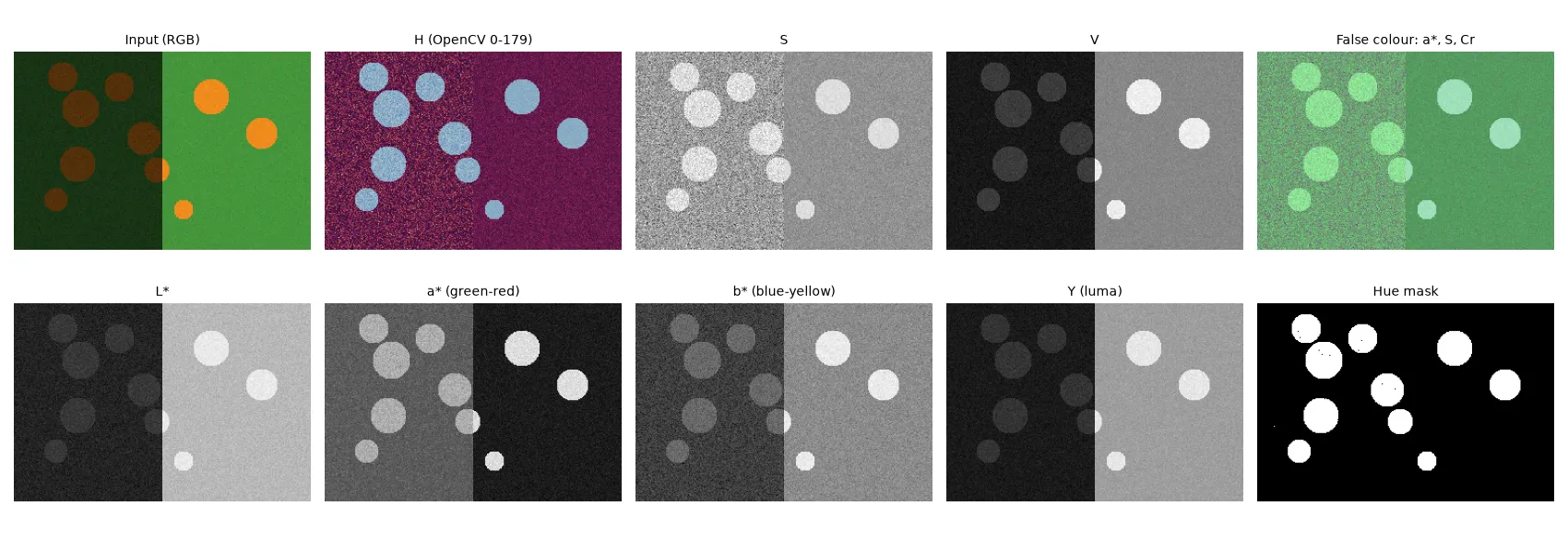
- Changing brightness or contrast without shifting colours: work only on or and leave the colour channels alone. That’s how histogram equalisation and CLAHE are usually applied to colour images; see contrast enhancement.
- Segmenting by colour under uneven light: use hue, with a minimum S and V. On the synthetic scene above, a rule tuned on the sunny side (“red channel > 180”) finds only 30% of the disc pixels, because the discs in shadow are dark. A hue rule (10–50°, S ≥ 80, V ≥ 30) finds all of them with no false positives. Look at the figure, though: and also change in the shadow. Lab separates lightness, but its colour values still scale with brightness, so it doesn’t ignore shadows.
- Measuring colour difference or clustering colours: use CIELAB and .
- Matching colour statistics between images: use a decorrelated opponent space like Lab; see colour transfer and histogram matching.
- Augmenting training data: hue, saturation and brightness jitter feel natural in HSV; see photometric colour augmentation.
A fun trick: false-colour composites
One experiment I enjoyed was merging single channels from different spaces into one three-channel image, for example , S and Cr shown as R, G and B. The result isn’t a “real” colour, but it can make a target pop out, because each channel was picked for contrast between the classes. It’s the same idea as false-colour images in remote sensing, and a quick way to see which features a classifier could use. It’s only a visual aid, though. Don’t feed it to a pretrained CNN, which expects normal RGB statistics.
Key takeaways
- RGB mixes brightness and colour. Most analysis gets easier once you separate them.
- Hue is an angle and means nothing at low saturation. Use circular distances and S/V limits.
- CIELAB is roughly perceptually uniform, so use to compare colours. Equal RGB steps can look about 2× different in size.
- Luma (BT.601) is also what OpenCV uses for greyscale.
- OpenCV expects BGR input, squeezes H into 0–179, and stores Lab in 0–255 with an offset of 128 for a and b.
Resources
- Gonzalez, R. C., Woods, R. E. Digital Image Processing, 4th ed., Chapter 6 (colour models, colour image processing).
- Szeliski, R. Computer Vision: Algorithms and Applications, 2nd ed., Section 2.3.2 (colour): https://szeliski.org/Book/
- OpenCV documentation, Color conversions (exact formulas and 8-bit scalings): https://docs.opencv.org/4.x/de/d25/imgproc_color_conversions.html
- ITU-R Recommendation BT.601 (luma weights): https://www.itu.int/rec/R-REC-BT.601
- Sharma, G., Wu, W., Dalal, E. N. (2005). The CIEDE2000 color-difference formula: implementation notes. Color Research & Application 30(1).