Contrast enhancement: histogram equalisation, CLAHE and gamma correction
How histogram equalisation, CLAHE, gamma correction and percentile stretching remap pixel values, why you should apply them to brightness only, and which one suits a bright, flat scene like snow.
Some images only use a thin slice of the grey levels they could use. A snowy landscape is the classic example: most pixels sit between 210 and 240, so faint ski tracks and the texture of the snow are almost invisible, and a model looking at the image doesn’t get much to work with. Contrast enhancement remaps pixel values so the useful differences get more of the range. Each method below is just a different answer to “what should the mapping look like?”. I compared them in 2022 and 2023 while looking at overexposed and snowy images.
Most of them are point operations: a pixel’s new value depends only on its old value. So for 8-bit images you can write each one as a lookup table (LUT) with 256 entries, which is why they’re so fast. CLAHE is the exception: it uses one LUT per tile and blends them, so the output also depends on where the pixel is.
A fake snowy test image
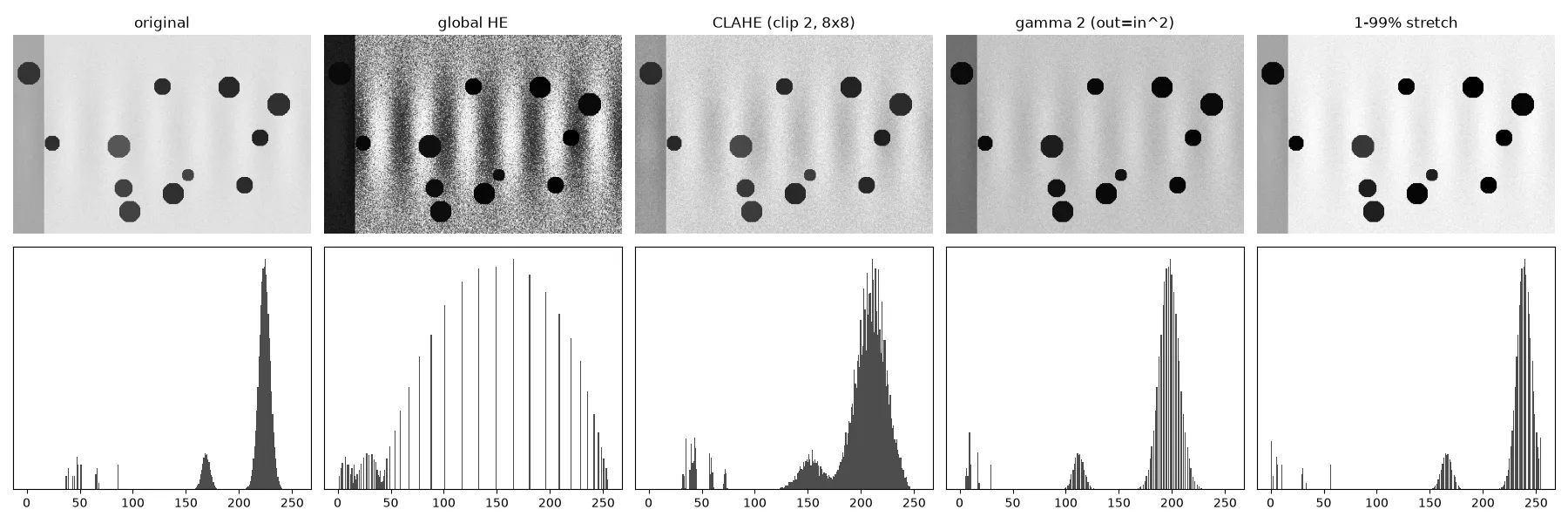
To keep things reproducible, I use a synthetic scene: bright snow around 225 with faint stripe-shaped tracks of ±8 grey levels, some dark round “trees” near 60, and a shaded strip on the left. Its histogram (bottom-left of the figure below) has one big narrow peak near the top of the range. That narrow peak is the whole problem: all the detail is squeezed inside it.
Linear stretch with percentile clipping
The simplest fix maps the darkest value to 0 and the brightest to 255 with a straight line. Plain min–max stretching barely does anything if a few pixels are already near 0 and 255, so clip first: use the 1st and 99th percentiles instead of the extremes, and saturate anything outside.
This keeps the order and the relative spacing of grey levels, so it never makes up structure. The downside is that it treats the whole range the same. In the snow image the dark trees take up part of the range, so the snow peak only widened from a standard deviation of 8.5 to 11.1.
Global histogram equalisation
Histogram equalisation (HE) picks the mapping that makes the output histogram as flat as possible. The tool for this is the cumulative distribution function (CDF). If is the number of pixels with value and is the total number of pixels,
Here is the CDF at the darkest grey level that actually shows up, so that level maps to 0. (Using the plain minimum of the CDF is a common bug: it’s 0 whenever the lowest levels are empty, and then the output never reaches 0.) The way I think about it: the CDF climbs steeply where lots of pixels are packed together, so crowded grey levels get pulled apart and empty ones get squeezed. For a continuous variable, pushing it through its own CDF gives a perfectly uniform distribution. With discrete levels it’s only roughly flat, which is why the equalised histogram looks like a comb.
import numpy as np

def equalize(gray):                      # gray: uint8 image
    hist = np.bincount(gray.ravel(), minlength=256)
    cdf = hist.cumsum() / gray.size
    cdf_min = cdf[hist > 0][0]           # CDF at the darkest level present
    lut = np.round(255 * (cdf - cdf_min) / (1 - cdf_min)).clip(0, 255).astype(np.uint8)
    return lut[gray]                     # same result as cv2.equalizeHist (within 1 level)
HE is heavy-handed. On the snow image the snow’s standard deviation jumped from 8.5 to 74. The faint tracks become strong bands, but the sensor noise in the snow gets boosted just as much, and the shaded strip turns almost black. Global HE uses one mapping for the whole image, so it can’t handle a region that’s bright in one corner and shaded in another.
CLAHE: local, with a limit
Adaptive histogram equalisation (AHE, Pizer et al., 1987) computes a separate mapping for each neighbourhood, so every region gets the full range. Done naively, it has two problems. It’s slow, and in flat regions it blows up the noise, because a tile whose histogram is one narrow peak gets stretched over 0–255.
Contrast Limited AHE (CLAHE, described by Zuiderveld, 1994) fixes both:
- Tiles. Split the image into a grid (OpenCV’s default is 8×8 tiles) and compute one histogram and one LUT per tile.
- Clip limit. Before building each CDF, cut every histogram bin at a limit and spread the excess evenly over all bins. The slope of the mapping is proportional to the histogram height, so this puts a cap on how much contrast can be added. A clip limit of 1 means no enhancement, and 2 to 4 is common. Higher limit = stronger contrast and more noise.
- Bilinear interpolation. A pixel’s output is a blend of the LUTs of the four nearest tile centres, weighted by distance. This gets rid of the visible tile borders a plain per-tile mapping would leave.
On the snow image, CLAHE with clip limit 2 raised the snow’s standard deviation to 18.7 (more than double) while keeping the noise in check, and the shaded strip kept its detail. For most “just make it readable” jobs, CLAHE is the first thing I try. Tile size matters, though: tiles should be bigger than the structures you want to keep, or CLAHE flattens them into the background.
Gamma correction
Gamma correction applies a power law to values scaled to :
With the curve sits above the diagonal, so dark values get lifted and shadows open up. With it sits below: the image gets darker, and the curve is steeper near the top, so bright values get spread apart. That makes the right direction for snow and overexposed images. With , the snow moved down from a mean of 224 to 197 and its spread grew (the slope of at is about 1.76), while the image still looked natural.
This tripped me up: libraries don’t agree on the convention.
skimage.exposure.adjust_gamma(img, gamma)computes , so darkens.- The popular LUT recipe (used in lots of tutorials) computes , so brightens.
Same number, opposite result. Always check with a test value, for example whether 0.5 maps to 0.25 or to 0.71.
def gamma_lut(gray, gamma):              # out = in ** gamma, skimage convention
    lut = (255 * (np.arange(256) / 255.0) ** gamma).round().astype(np.uint8)
    return lut[gray]
Gamma correction is global and smooth. It never reorders values and never creates bands, but it can’t fix an image that needs different treatment in different places.
Work on brightness, not on R, G and B
All these methods are defined for one channel. If you apply them to R, G and B separately, you change the ratio between the channels, and that ratio is what we see as hue. The safe way is to convert to a colour space that splits brightness from colour, enhance only the brightness channel, and convert back. That means the L channel of CIELAB or the Y channel of YUV/YCrCb (see colour spaces).
import cv2

def clahe_on_luminance(rgb, clip=2.0, tiles=(8, 8)):
    lab = cv2.cvtColor(rgb, cv2.COLOR_RGB2LAB)
    lab[..., 0] = cv2.createCLAHE(clipLimit=clip, tileGridSize=tiles).apply(lab[..., 0])
    return cv2.cvtColor(lab, cv2.COLOR_LAB2RGB)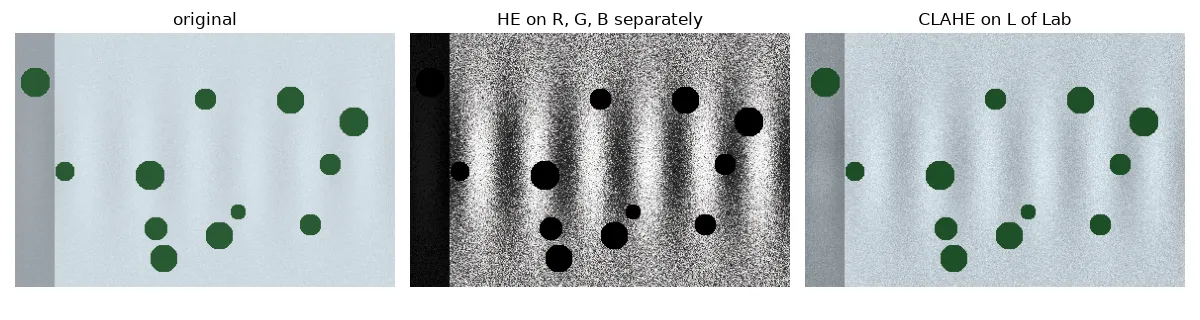
In the colour version of the test scene, equalising each RGB channel separately removed the slight blue tint of the snow and turned the green trees black (their hue moved by 66 of OpenCV’s 180 hue steps). CLAHE on L left their hue alone and only changed brightness.
A side note on sharpening
Sharpening often gets used alongside these methods, but it’s a linear filter, not a remapping of grey levels. The classic kernels subtract the Laplacian from the identity (an unchanged image), for example
A sharpening kernel should sum to 1, so flat regions keep their brightness. If you apply it to 8-bit data with an 8-bit output, the overshoots at edges get clipped to 0 or 255. Filter in floating point and clip once at the end. How this relates to blurring is in linear filters and the Gaussian blur.
Which one to pick
- Narrow histogram, no big lighting differences: percentile stretch or gamma. They’re predictable and never create artefacts.
- Bright, washed-out image like snow: gamma with (in the convention), or CLAHE on L if local detail matters.
- Uneven lighting, with shadows and bright areas together: CLAHE.
- Global HE: mostly for looking at images. It’s usually too strong for data you’ll feed to a model.
- Preprocessing for a neural network: use the same method at training and inference time, or the model will see a different kind of input. Often random gamma and contrast changes during training (augmentation) are a better idea than one fixed enhancement.
Key takeaways
- Contrast enhancement is a remapping of grey levels, usually done with a 256-entry lookup table (one per tile for CLAHE).
- Histogram equalisation pushes each value through the image’s CDF. It’s strong, global and boosts noise.
- CLAHE equalises tiles, clips each histogram to cap the gain, and blends neighbouring tiles smoothly. It’s the best all-round choice.
- Gamma in the convention spreads out the highlights, which helps with snow and overexposure. Check which convention your library uses.
- Only enhance the brightness channel (L or Y), so the hues stay the same.
Resources
- Zuiderveld, K. “Contrast Limited Adaptive Histogram Equalization.” In Graphics Gems IV, Academic Press, 1994.
- Pizer, S. M. et al. “Adaptive histogram equalization and its variations.” Computer Vision, Graphics, and Image Processing 39, 1987.
- Gonzalez, R. C., Woods, R. E. Digital Image Processing, 4th ed., Chapter 3 (intensity transformations, histogram processing).
- scikit-image documentation,
skimage.exposure(adjust_gamma,equalize_adapthist,rescale_intensity): https://scikit-image.org/docs/stable/api/skimage.exposure.html - OpenCV tutorial, “Histograms 2: Histogram Equalization” (includes CLAHE): https://docs.opencv.org/4.x/d5/daf/tutorial_py_histogram_equalization.html