Bounding-box formats: corners, centres, YOLO, Pascal VOC and COCO, and how to convert without bugs
What the common box formats store, how to convert between them, what happens to boxes when you resize or letterbox an image, and the small mistakes that quietly break a detection dataset.
A bounding box is just four numbers. The annoying part is that there are at least five common ways to write those four numbers down, and annotation tools, datasets, training code and evaluation code rarely agree. A box in the wrong format doesn’t crash anything. The model just trains on shifted or stretched targets, or the evaluation says your mAP is close to zero, and you end up debugging the model when the problem is the data. In early 2023 I wrote small converters between annotation exports, Pascal VOC XML and YOLO text files, plus scripts that drew the boxes back on the image so I could check them. These are the things I picked up from that, shown with made-up examples.
The formats
Every format puts the origin at the top-left corner of the image, with going right and going down.
| Name | Four numbers | Units | Typical home |
|---|---|---|---|
corners, xyxy | pixels | Pascal VOC XML, torchvision | |
xywh | , width , height | pixels | COCO JSON |
cxcywh | centre , width, height | pixels | many detector heads, DETR |
| YOLO | cxcywh divided by image width and height | fractions in | YOLO .txt label files |
The mean average precision note has a short version of this table. This note is about the little details that cause bugs.
Converting between them
The conversions themselves are just simple arithmetic. Write them once so they work on a whole array at a time, and test them with round trips (convert there and back, and check you get the same boxes).
import numpy as np

def xyxy_to_xywh(b):  return np.c_[b[:, :2], b[:, 2:] - b[:, :2]]
def xywh_to_xyxy(b):  return np.c_[b[:, :2], b[:, :2] + b[:, 2:]]
def xyxy_to_cxcywh(b): return np.c_[(b[:, :2] + b[:, 2:]) / 2, b[:, 2:] - b[:, :2]]
def cxcywh_to_xyxy(b): return np.c_[b[:, :2] - b[:, 2:] / 2, b[:, :2] + b[:, 2:] / 2]

def to_yolo(b_xyxy, img_w, img_h):          # normalised cxcywh
    return xyxy_to_cxcywh(b_xyxy) / [img_w, img_h, img_w, img_h]

def from_yolo(b_yolo, img_w, img_h):
    return cxcywh_to_xyxy(b_yolo * [img_w, img_h, img_w, img_h])

boxes = np.array([[100., 50., 300., 250.], [400., 120., 620., 380.]])
W, H = 640, 400
print(np.round(to_yolo(boxes, W, H), 4))    # [[0.3125 0.375 0.3125 0.5], [0.7969 0.625 0.3438 0.65]]
assert np.allclose(from_yolo(to_yolo(boxes, W, H), W, H), boxes)
assert np.allclose(xywh_to_xyxy(xyxy_to_xywh(boxes)), boxes)
Note that values get divided by the image width and values by the height. On a square image, mixing them up changes nothing, so the bug stays hidden until the first non-square image shows up.
The file formats
YOLO text. One .txt per image with the same base name, and one line per object: class cx cy w h. Class numbers start at 0, and the class names live in a separate file. An image with no objects should still get an empty .txt file. That way the loader knows the image really has nothing in it, rather than thinking the label is missing.
Pascal VOC XML. One XML file per image. It stores the image size, and for each object a name, flags like difficult and truncated, and a bndbox with xmin, ymin, xmax, ymax. This tripped me up: VOC coordinates are 1-based and inclusive. A box covering the first 10 pixel columns is written xmin=1, xmax=10. To turn that into continuous 0-based edges, subtract 1 from the min values only:
import xml.etree.ElementTree as ET

def read_voc(text):
    root = ET.fromstring(text)
    W, H = int(root.find("size/width").text), int(root.find("size/height").text)
    objs = []
    for obj in root.iter("object"):
        bb = obj.find("bndbox")
        x1, y1, x2, y2 = (float(bb.find(k).text) for k in ("xmin", "ymin", "xmax", "ymax"))
        objs.append((obj.find("name").text, [x1 - 1, y1 - 1, x2, y2]))  # 1-based inclusive -> 0-based edges
    return W, H, objs
But lots of tools write VOC files with 0-based values anyway, so check a few boxes against the image before you trust either one. Also read the values with float, because some exporters write decimals.
COCO JSON. One file for the whole dataset, with three main lists: images (id, file_name, width, height), annotations (image_id, category_id, bbox as [x, y, w, h] in float pixels, area, iscrowd) and categories. COCO uses continuous coordinates, so is the top-left corner of the top-left pixel. Category ids start at 1 and can have gaps (the official 80 classes use ids up to 90). So when converting to YOLO, build an explicit mapping to 0-based numbers with no gaps:
cats = [{"id": 3, "name": "car"}, {"id": 7, "name": "bus"}]
cat_to_idx = {c["id"]: i for i, c in enumerate(sorted(cats, key=lambda c: c["id"]))}
ann = {"image_id": 1, "category_id": 3, "bbox": [100.0, 50.0, 200.0, 200.0]}
cx, cy, w, h = to_yolo(xywh_to_xyxy(np.array([ann["bbox"]])), 640, 400)[0]
print(f"{cat_to_idx[ann['category_id']]} {cx:.6f} {cy:.6f} {w:.6f} {h:.6f}")  # 0 0.312500 0.375000 ...
One more surprise: COCO’s area is the area of the segmentation mask, not . The COCO evaluator uses it to sort objects into small, medium and large.
Boxes after resizing
If you resize the image from to , every gets multiplied by and every by . Normalised YOLO boxes don’t need any change at all, which is one reason people like that format.
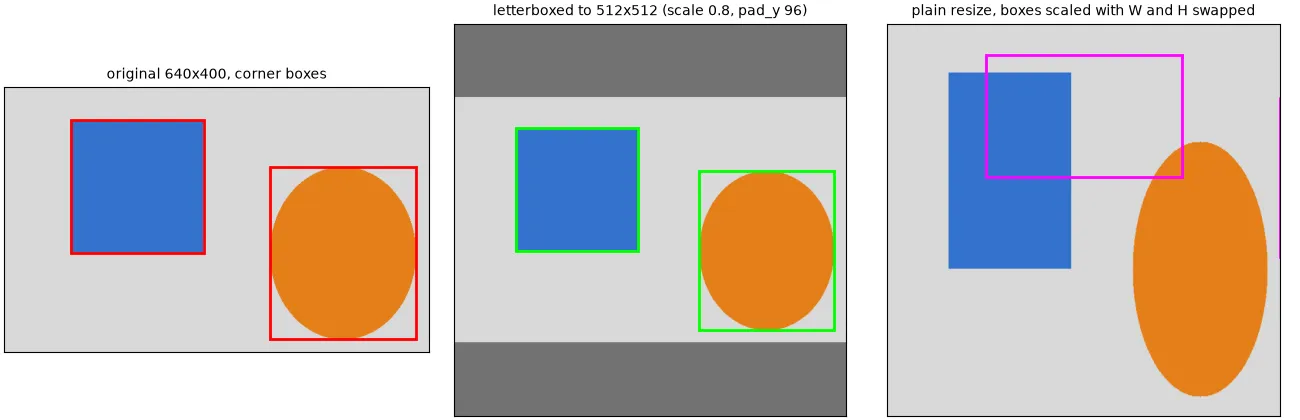
Most detectors letterbox instead. That means: scale by one factor so the shape stays the same, then pad to an square. Boxes then go through and , where are the padding offsets. Before you compare predictions with the original labels, or draw them on the original image, you have to run them back through the inverse.
def letterbox_params(old_wh, size):
    r = min(size / old_wh[0], size / old_wh[1])
    new_w, new_h = round(old_wh[0] * r), round(old_wh[1] * r)
    return r, (size - new_w) / 2, (size - new_h) / 2       # scale, pad_x, pad_y

def letterbox_boxes(b, r, px, py):   return b * r + [px, py, px, py]
def unletterbox_boxes(b, r, px, py): return (b - [px, py, px, py]) / r

r, px, py = letterbox_params((640, 400), 512)              # r = 0.8, px = 0, py = 96
lb = letterbox_boxes(boxes, r, px, py)
assert np.allclose(unletterbox_boxes(lb, r, px, py), boxes)
If the padding only goes on the bottom and right instead of being split evenly, then and only the scale matters. Whatever you choose, the code that pads the image and the code that moves the boxes have to agree.
Clipping
Annotation tools often let boxes go past the image border, and augmentations (crops, shifts, rotations) push boxes out too. So clip to and to , then drop boxes that got too thin:
def clip_boxes(b, img_w, img_h, min_size=1):
    b = b.copy()
    b[:, [0, 2]] = b[:, [0, 2]].clip(0, img_w)
    b[:, [1, 3]] = b[:, [1, 3]].clip(0, img_h)
    keep = (b[:, 2] - b[:, 0] > min_size) & (b[:, 3] - b[:, 1] > min_size)
    return b[keep]
Clip before converting to YOLO. Otherwise a centre near the border with a big width gives normalised corners outside , and some loaders reject that while others quietly accept it. For boxes that get cut by a tile or crop border, see tiling large images for detection.
Rotated (oriented) boxes
Straight, axis-aligned boxes don’t fit things like aerial images, text or ships very well. An oriented bounding box adds an angle: . Some datasets, like DOTA, store the four corner points instead. To get the corners, take the corners of a straight box centred at the origin, rotate them, then shift them into place:
def obb_corners(cx, cy, w, h, theta):           # theta in radians
    c, s = np.cos(theta), np.sin(theta)
    local = np.array([[-w, -h], [w, -h], [w, h], [-w, h]]) / 2
    return local @ np.array([[c, -s], [s, c]]).T + [cx, cy]

pts = obb_corners(200, 150, 120, 40, np.deg2rad(30))
print(np.r_[pts.min(0), pts.max(0)].round(1))   # enclosing axis-aligned box: [138. 102.7 262. 197.3]
Because points down, a positive looks clockwise on screen. Libraries don’t agree on angles either: degrees or radians, ranges of , or , and whether is always the longer side. Check which one a tool uses before mixing tools. The same rotation works for scaling or rotating any polygon around its centre; see geometric transformations.
Bugs to watch for
- versus . NumPy’s
img.shapeis(height, width, channels), but PIL’sImage.sizeandresize()use(width, height). Taking the scale factors from one and the target size from the other is exactly the bug in the right panel above. You can’t see it on square images. - Wrong normaliser. Normalising by the original size after you’ve resized the image, or by the model input size instead of the image size.
- Off-by-one. Mixing VOC’s 1-based inclusive pixels with 0-based continuous coordinates shifts every box by one pixel and makes widths one pixel bigger. That’s nothing for big objects, but for 10-pixel objects it really hurts IoU.
- Rounding to integers too early.
int()cuts off towards zero. Keep floats until you draw or write the final file. - Horizontal flip. and . If you forget to swap, you get negative widths.
- Things quietly disappearing. Boxes with zero or negative width, labels without images, and images without label files. Count objects before and after every conversion.
The cheapest test is just looking: after every conversion, draw a few random samples back on their images and check them by eye.
Key takeaways
- Know which of
xyxy,xywh,cxcywhand normalised YOLO each tool wants, and convert everything to one format inside your own code (corners in float pixels works well). - Divide by width and by height. NumPy shapes are and PIL sizes are .
- VOC is 1-based inclusive. COCO is continuous, with 1-based category ids that have gaps. YOLO class ids are 0-based.
- Resizing scales boxes. Letterboxing scales and shifts them, and predictions have to be mapped back with the inverse.
- Clip, drop broken boxes, round-trip test your converters, and always draw the result.
Resources
- Mark Everingham et al., “The PASCAL Visual Object Classes (VOC) Challenge”, IJCV 88 (2010), and the VOC development kit documentation: https://link.springer.com/article/10.1007/s11263-009-0275-4
- COCO consortium, “Data format”: https://cocodataset.org/#format-data
- Tsung-Yi Lin et al., “Microsoft COCO: Common Objects in Context” (2014): https://arxiv.org/abs/1405.0312
- Ultralytics documentation, “Object detection datasets overview” (YOLO label format): https://docs.ultralytics.com/datasets/detect/
- PyTorch,
torchvision.ops.box_convert: https://pytorch.org/vision/stable/generated/torchvision.ops.box_convert.html - Gui-Song Xia et al., “DOTA: A Large-scale Dataset for Object Detection in Aerial Images”, CVPR 2018: https://arxiv.org/abs/1711.10398