Mean average precision: how object detectors are scored
How detected boxes get matched to real boxes with IoU, how that turns into a precision-recall curve, and how AP, mAP@0.5 and COCO's mAP@[.5:.95] come out of it.
For classification, scoring is easy: count how many labels are right. Detection is messier. A detector spits out any number of boxes, each with a class and a score, and a box can be right, a bit off, a duplicate, or just noise. Mean average precision (mAP) is the usual way to squash all of that into one number. I wanted to understand it properly, because small choices in how it’s computed (the IoU threshold, the interpolation, the matching rule) can shift the score by several points.
First, agree on the box format
Before matching anything, predictions and ground truth have to use the same box format. These four show up a lot:
| Format | Numbers | Used by |
|---|---|---|
corners, xyxy | in pixels | Pascal VOC, torchvision |
xywh | , width, height in pixels | COCO |
cxcywh | centre , centre , width, height | many detector heads |
| YOLO | cxcywh divided by image width and height, so in | YOLO label files |
A box at corners is in COCO format and has centre . If you mix formats by accident, you get IoUs near zero and an mAP near zero, and it looks like the model is broken when really the evaluation is. So I just convert everything to corners before scoring. (The bounding-box formats note has the converters and the usual bugs.)
Step 1: is a detection correct?
A detection counts as a true positive (TP), meaning a correct hit, only when all three of these are true:
- It has the same class as a ground-truth box in the same image.
- Its intersection over union with that box is at least a threshold , usually . IoU is the overlap area divided by the union area (details in overlap-based losses).
- That ground-truth box has not already been claimed by a higher-scoring detection.
Rule 3 is the one that punishes duplicates, and it took me a moment to see why it matters. Detections are handled from highest score to lowest, so the best one claims the object, and every later box on that same object becomes a false positive (FP). That’s why detectors run non-maximum suppression (removing overlapping boxes) before evaluation. Ground-truth boxes that nobody claims are false negatives, objects we missed.
import numpy as np

def iou(a, b):
    """a, b: boxes as (x1, y1, x2, y2)."""
    iw = max(0.0, min(a[2], b[2]) - max(a[0], b[0]))
    ih = max(0.0, min(a[3], b[3]) - max(a[1], b[1]))
    inter = iw * ih
    return inter / ((a[2]-a[0])*(a[3]-a[1]) + (b[2]-b[0])*(b[3]-b[1]) - inter)

def match(dets, gts, thr=0.5):
    """dets: list of (image_id, score, box) for ONE class; gts: dict image_id -> boxes.
    Returns TP flags (1/0) in descending-score order, and the number of ground truths."""
    dets = sorted(dets, key=lambda d: d[1], reverse=True)
    used = {k: [False] * len(v) for k, v in gts.items()}
    tp = []
    for img, score, box in dets:
        ious = [iou(box, g) for g in gts.get(img, [])]
        j = int(np.argmax(ious)) if ious else -1
        if j >= 0 and ious[j] >= thr and not used[img][j]:
            used[img][j] = True          # each ground truth can be matched once
            tp.append(1)
        else:
            tp.append(0)                 # duplicate, poor overlap, or nothing there
    return np.array(tp), sum(len(v) for v in gts.values())
Matching is done per image and per class. A detection in image 3 can never match a box in image 7.
Step 2: from ranked matches to a precision-recall curve
Now walk down the list sorted by score. After the top detections, with true positives among them and ground-truth boxes in total:
Precision asks “of what I reported, how much was right?”. Recall asks “of what was there, how much did I find?”. The nice trick here: every possible score threshold is just one cut-off point in this list. So walking the list traces out a whole curve, and you never have to pick a threshold.
Here’s a tiny example with three ground-truth boxes in two images:
gts = {0: [(10, 10, 50, 50), (60, 60, 90, 100)], 1: [(20, 30, 70, 80)]}
dets = [(0, 0.95, (12, 11, 49, 52)),      # good match
        (0, 0.90, (11, 12, 51, 50)),      # duplicate of the same object
        (1, 0.80, (25, 30, 72, 85)),      # good match
        (0, 0.60, (100, 100, 130, 130)),  # background
        (0, 0.40, (62, 58, 88, 97))]      # good match, but low score
tp, n_gt = match(dets, gts)
print(tp)   # [1 0 1 0 1]
# precision: 1.00 0.50 0.67 0.50 0.60
# recall:    0.33 0.33 0.67 0.67 1.00
Step 3: average precision is the area under that curve
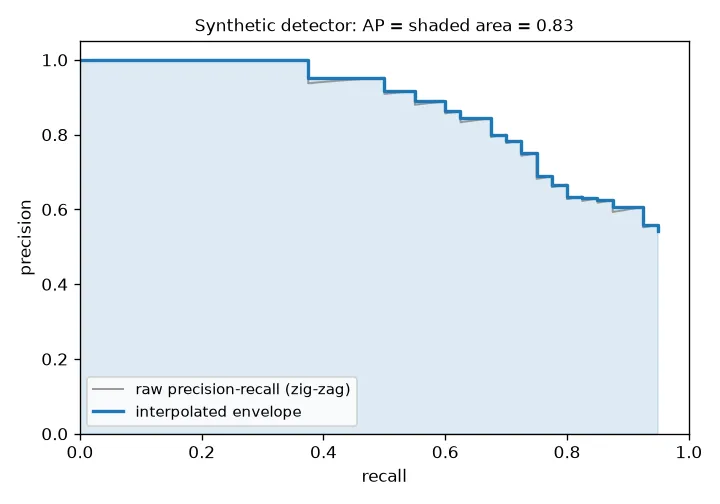
The raw curve zig-zags: every false positive pulls precision down, every true positive pushes it up a little. The usual fix is interpolation: at each recall level, swap the precision for the best precision you reach at that recall or higher. The way I picture it, you lay a staircase over the top of the zig-zag that only ever goes down. AP is the area under that staircase.
def average_precision(tp, n_gt):
    tp_cum = np.cumsum(tp)
    precision = tp_cum / np.arange(1, len(tp) + 1)
    recall = tp_cum / n_gt
    r = np.concatenate([[0], recall, [1]])
    p = np.concatenate([[1], precision, [0]])
    p = np.maximum.accumulate(p[::-1])[::-1]       # envelope: best precision to the right
    idx = np.where(r[1:] != r[:-1])[0]             # points where recall changes
    return float(np.sum((r[idx + 1] - r[idx]) * p[idx + 1]))

print(round(average_precision(tp, n_gt), 3))   # 0.756
Here AP . Look at what hurt: the duplicate at rank 2 and the background box at rank 4 both sit above a real object in the ranking, so they drag down precision at the recall levels that come after.
There are three common ways to compute the area, and they give slightly different numbers:
- VOC 2007, 11-point: average the envelope at recall .
- VOC 2010+, all-point: the exact area under the envelope, as above.
- COCO, 101-point: the envelope sampled at recall .
The YOLOv1 code-along I followed used the trapezoid rule on the raw zig-zag curve, with no staircase. That gives a lower, noisier number than any official method. It’s fine for watching training progress, but you can’t compare it with numbers in papers.
Step 4: the “mean” in mAP
AP is computed per class, and mAP is just the plain average over classes. So a rare class counts as much as a common one. A class with no ground truth in the test set is skipped.
Pascal VOC reports mAP at one IoU threshold of 0.5, written mAP@0.5 or AP50. COCO’s main metric, mAP@[.5:.95], averages AP over ten thresholds, , and then over classes. Basically, it rewards boxes that fit tightly:
aps = [average_precision(*match(dets, gts, thr)) for thr in np.arange(0.5, 0.96, 0.05)]
print(round(float(np.mean(aps)), 3))   # 0.537
# per threshold: 0.76 x6, then 0.33, 0.33, 0.17, 0.0
The toy detector gets 0.76 at IoU 0.5 but only 0.54 on the COCO metric, because its boxes are close but not tight. COCO also reports AP for small, medium and large objects (areas below , between and , and above pixels) and average recall at a fixed number of detections per image.
Easy ways to get it wrong
- Filtering by score before evaluation. mAP already sweeps over every threshold. If you drop low-score boxes first, the curve gets cut short and recall goes down. So keep a very low threshold (like 0.001) when evaluating.
- NMS settings change mAP. Too loose and duplicates turn into false positives; too tight and real objects sitting next to each other get removed.
>versus>=. Whether a detection with IoU of exactly 0.5 counts is just a convention. The official tools use>=.- Use a reference implementation (pycocotools, torchmetrics) for numbers you’ll publish. Writing your own once is great for understanding it, though.
Key takeaways
- A detection is a true positive only if the class matches, the IoU passes the threshold, and no higher-scoring detection already took that object.
- Sort by score, count up TPs and FPs as you go, and you get a precision-recall curve without picking a threshold.
- AP is the area under the smoothed (only-going-down) precision-recall curve; mAP averages AP over classes.
- mAP@0.5 checks “did you find it?”; COCO’s mAP@[.5:.95] also checks “did you box it tightly?”.
- Box formats, NMS settings and the way you compute the area all change the number, so say which you used with every result.
Resources
- Everingham et al., “The PASCAL Visual Object Classes (VOC) Challenge”, IJCV 2010. Springer
- Lin et al., “Microsoft COCO: Common Objects in Context”, ECCV 2014. arXiv:1405.0312
- COCO detection evaluation page: cocodataset.org/#detection-eval
- Aladdin Persson, “Mean Average Precision (mAP) explained and PyTorch implementation” video and the Machine-Learning-Collection repo, which I coded along with for YOLOv1.
torchvision.ops.box_convertfor converting between box formats: PyTorch docstorchmetricsMeanAveragePrecision: docs- Related notes: YOLOv1, anchors and NMS for proposals, overlap-based losses.