Detecting small objects in very large images: tiling, clipping and stitching
How to cut a huge image into overlapping tiles, carry box and polygon labels into each tile correctly (including objects cut by the tile edge), and stitch the tile predictions back into one clean result.
Aerial photos, satellite scenes, microscopy slides and scanned documents are often 5,000 to 50,000 pixels on a side. Detectors, on the other hand, are trained on inputs of roughly 512 to 1,333 pixels. If you just shrink the whole image to fit, a 30-pixel object turns into a 3-pixel smudge that no feature map can pick up. The usual fix is to cut the image into tiles at (or close to) full resolution, train and predict on the tiles, and stitch the results back together. The idea is simple. The bugs hide at the tile borders: objects cut in half, polygons clipped wrongly, and the same object detected twice.
Why not just resize?
A detector’s finest feature map usually has stride 4 or 8 (one cell per 4 or 8 input pixels), and anchors or detection points need an object to cover several cells (see designing anchors for why you need roughly 6× the stride). Shrinking a image to divides every object side by 10. Objects that were easy to detect end up smaller than one cell. Memory is the other limit. Activations grow with the number of pixels, so the full-resolution image in one go rarely fits on a GPU.
Tiling keeps the original resolution and caps the memory per forward pass. What you pay: more forward passes, no context beyond the tile border, and extra work for objects that cross borders.
Laying out the tiles
Pick a tile size (often the model’s input size) and an overlap in pixels. A new tile starts every pixels. Two things are easy to get wrong:
- The last tile. If isn’t a multiple of the step, a naive loop either misses the right/bottom strip or makes a smaller last tile. Shifting the last tile back so it ends exactly at the image edge keeps every tile full-size. You just get a bit more overlap there.
- Images smaller than one tile. Pad them up to instead of making a ragged tile.
import numpy as np

def tile_starts(length, tile, overlap):
    if length <= tile:
        return [0]                                     # one tile; pad the image up to `tile`
    starts = list(range(0, length - tile + 1, tile - overlap))
    if starts[-1] + tile < length:
        starts.append(length - tile)                   # last tile ends exactly at the edge
    return starts

def tile_grid(img_h, img_w, tile, overlap):            # tiles as (x0, y0, x1, y1)
    return [(x, y, x + tile, y + tile)
            for y in tile_starts(img_h, tile, overlap)
            for x in tile_starts(img_w, tile, overlap)]

print(tile_starts(1000, 256, 64))
tiles = tile_grid(700, 1000, tile=256, overlap=64)
print(len(tiles), "tiles, first three:", tiles[:3])
[0, 192, 384, 576, 744]
20 tiles, first three: [(0, 0, 256, 256), (192, 0, 448, 256), (384, 0, 640, 256)]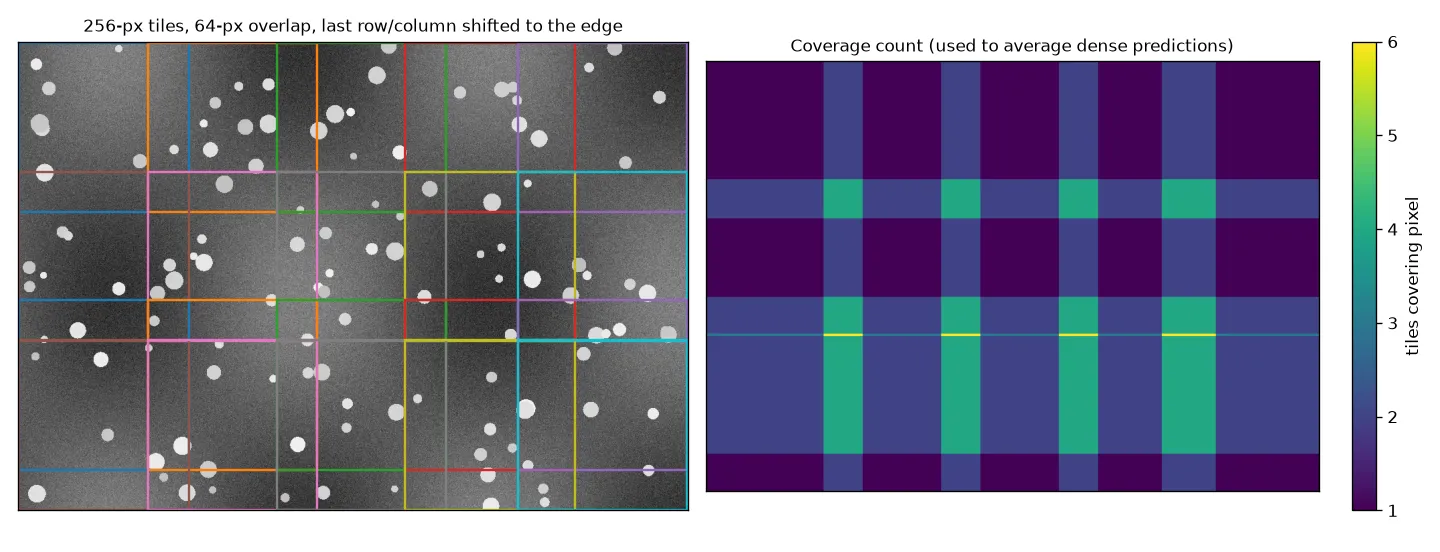
How much overlap? If every object you care about has to appear whole in at least one tile, the overlap must be at least the size of the biggest such object. More overlap means more tiles. The count grows like , so going from 10% to 50% overlap roughly triples the work. On the plus side, overlap gives each pixel a second look with more context, which helps at inference time.
Empty tiles. Tiles that are pure padding or “no data” (like the black borders of a satellite scene) can be skipped. Tiles with real content but no objects are different: they’re useful negatives for training. Keep some so the model learns what background looks like, but you can subsample them if there are too many.
Carrying boxes into a tile
For each tile, every annotation has to be shifted into tile coordinates and cut to the tile. For boxes, cutting just means clipping the corners. The real question is which partial objects to keep. A common rule: keep a clipped box only if enough of the original area is still visible and what’s left isn’t a thin sliver.
def boxes_for_tile(boxes, tile, min_visible=0.5, min_side=4):
    x0, y0, x1, y1 = tile
    c = boxes.copy()
    c[:, [0, 2]] = c[:, [0, 2]].clip(x0, x1)
    c[:, [1, 3]] = c[:, [1, 3]].clip(y0, y1)
    w, h = c[:, 2] - c[:, 0], c[:, 3] - c[:, 1]
    visible = w * h / ((boxes[:, 2] - boxes[:, 0]) * (boxes[:, 3] - boxes[:, 1]))
    keep = (visible >= min_visible) & (w >= min_side) & (h >= min_side)
    return c[keep] - [x0, y0, x0, y0], visible

boxes = np.array([[100, 100, 140, 150],    # fully inside
                  [230, 40, 300, 90],      # crosses the right edge
                  [250, 200, 262, 300],    # mostly outside, thin
                  [10, 10, 30, 30]], float)
kept, visible = boxes_for_tile(boxes, (0, 0, 256, 256))
print("visible fraction:", visible.round(2))
print(kept)
visible fraction: [1. 0.37 0.28 1. ]
[[100. 100. 140. 150.]
[ 10. 10. 30. 30.]]There’s no perfect choice here, only trade-offs. This part took me a while to really get:
- Drop small fragments (like above). The model isn’t asked to detect a sliver it can’t recognise. But the dropped object’s pixels are still in the tile, now with no label, so the loss treats them as background. The model gets punished for firing on a real object.
- Keep every fragment. No wrong “background” labels, but the model learns to output partial boxes, and stitching then has to merge them with the full detections from neighbouring tiles.
- Mark dropped fragments as “ignore” regions (or crowd boxes). Anchors or points that overlap them get no loss either way. This is the cleanest option if your training code supports ignore regions.
Carrying polygons into a tile: intersect, don’t clamp
For instance masks stored as polygons, it’s tempting to shift the vertices and clamp each coordinate into the tile. That’s only right when the polygon’s edges cross the border at right angles. For any slanted edge, clamping slides the vertices sideways, so the clamped polygon covers pixels outside the object and misses pixels inside it. What you actually want is the geometric intersection of the polygon with the tile rectangle, and a library like Shapely does that exactly.
from shapely.geometry import Polygon, box as tile_box

def polygon_for_tile(coords, tile, min_visible=0.5):
    poly = Polygon(coords)
    if not poly.is_valid:
        poly = poly.buffer(0)                      # repair self-intersections first
    part = poly.intersection(tile_box(*tile))
    if part.is_empty or part.area < min_visible * poly.area:
        return None
    pieces = getattr(part, "geoms", [part])        # the cut can split one object in two
    x0, y0 = tile[:2]
    return [np.asarray(p.exterior.coords)[:-1] - (x0, y0)
            for p in pieces if p.geom_type == "Polygon"]

stick = [(200, 100), (320, 220), (300, 240), (180, 120)]      # thin diagonal object
clamped = np.array(stick, float)
clamped[:, 0] = clamped[:, 0].clip(0, 256)                      # the naive way
exact = Polygon(polygon_for_tile(stick, (0, 0, 256, 256), min_visible=0)[0])
print(f"clamped area {Polygon(clamped).area:.0f}, true area {exact.area:.0f}, "
      f"clamped area outside the object {Polygon(clamped).difference(exact).area:.0f}")

u_shape = [(60, 200), (90, 200), (90, 270), (130, 270), (130, 200), (160, 200), (160, 300), (60, 300)]
print("pieces after the cut:", len(polygon_for_tile(u_shape, (0, 0, 256, 256), min_visible=0)))
clamped area 2520, true area 2640, clamped area outside the object 1420
pieces after the cut: 2For the thin diagonal object, more than half of the clamped polygon is outside the object. The area numbers look close, which is what makes this bug sneaky. Two more things from the example. A cut can split one object into several pieces (the U-shape becomes two separate parts, which together are still one instance mask). And polygons with holes need their interiors handled too (the snippet keeps only exteriors to stay short). If your masks are stored as rasters instead of polygons, you don’t need any of this: cropping the mask array with the same slice as the image is exact.
Stitching predictions back together
At inference, run the model on every tile, then:
- Shift each prediction by its tile origin into full-image coordinates.
- Drop predictions that touch an inner tile border. A box touching a border that isn’t also the image border is probably a cut object. If the overlap is at least the object size, a neighbouring tile sees the whole thing.
- Merge duplicates across tiles. Normal NMS (non-maximum suppression) with IoU fails when a partial box sits inside a full box: their IoU can be low even though they’re the same object. Intersection over the smaller box (IoS) catches this case. SAHI uses this kind of matching and can merge matched boxes (non-maximum merging) instead of deleting them.
def area(b):
    return (b[:, 2] - b[:, 0]) * (b[:, 3] - b[:, 1])

def touches_inner_border(b, tile, img_w, img_h, margin=2):
    x0, y0, x1, y1 = tile
    return (((b[:, 0] <= x0 + margin) & (x0 > 0)) | ((b[:, 1] <= y0 + margin) & (y0 > 0)) |
            ((b[:, 2] >= x1 - margin) & (x1 < img_w)) | ((b[:, 3] >= y1 - margin) & (y1 < img_h)))

def suppress_by_ios(boxes, scores, thr=0.6):       # greedy, like NMS, but IoS instead of IoU
    order, keep = np.argsort(-scores), []
    while order.size:
        i, order = order[0], order[1:]
        keep.append(i)
        inter = np.clip(np.minimum(boxes[i, 2:], boxes[order, 2:]) -
                        np.maximum(boxes[i, :2], boxes[order, :2]), 0, None).prod(1)
        order = order[inter / np.minimum(area(boxes[[i]]), area(boxes[order])) <= thr]
    return np.array(keep)

# one object at x = 230..290: cut by the first tile, whole in the second (tile coordinates)
tile_preds = {(0, 0, 256, 256):   (np.array([[230., 40, 256, 90]]), np.array([0.8])),
              (192, 0, 448, 256): (np.array([[38., 40, 98, 90]]),   np.array([0.9]))}
all_boxes, all_scores = [], []
for t, (b, s) in tile_preds.items():
    g = b + [t[0], t[1], t[0], t[1]]                          # step 1: to image coordinates
    ok = ~touches_inner_border(g, t, img_w=1000, img_h=700)   # step 2
    all_boxes.append(g[ok]); all_scores.append(s[ok])
all_boxes, all_scores = np.vstack(all_boxes), np.concatenate(all_scores)
print(all_boxes[suppress_by_ios(all_boxes, all_scores)])      # step 3
[[230. 40. 290. 90.]]Here the border filter alone already removed the cut copy. The IoS step is the safety net for objects bigger than the overlap, which no tile sees whole.
Dense outputs (semantic masks, heatmaps) get stitched differently. Add each tile’s per-pixel probabilities into a full-size array, count how many tiles covered each pixel (the right panel of the figure above), and divide. Predictions near tile borders are less reliable because the network sees less context there, so a weight that fades toward the tile edges (instead of a flat 1) usually gives smoother seams. U-Net’s “overlap-tile” strategy is the classic version of this.
def stitch_dense(tile_probs, tiles, img_h, img_w):
    total = np.zeros((img_h, img_w)); count = np.zeros((img_h, img_w))
    for p, (x0, y0, x1, y1) in zip(tile_probs, tiles):
        total[y0:y1, x0:x1] += p
        count[y0:y1, x0:x1] += 1
    return total / np.maximum(count, 1)

probs = [np.full((256, 256), i % 2, float) for i in range(len(tiles))]   # dummy tile outputs
full = stitch_dense(probs, tiles, 700, 1000)
print(full.shape, "values in overlaps:", np.unique(full.round(2)))
(700, 1000) values in overlaps: [0. 0.33 0.5 0.67 1. ]Tiles for training vs. tiles for inference
The two sides don’t have to use the same layout. For training, random crops of tile size (with the same clipping rules) give more variety than a fixed grid, and the model gets to see objects at every position relative to the border. For inference, a fixed overlapping grid makes sure everything is covered. The SAHI paper also adds one full-image, downscaled pass at inference, so large objects that no tile holds whole still get detected. Whatever you do, keep the pixel scale the same between training and inference: a model trained on full-resolution tiles shouldn’t be run on a downscaled image.
Key takeaways
- Tile instead of shrinking when objects would end up smaller than a few feature-map cells. Keep every tile full-size by shifting the last one back to the edge.
- Overlap should be at least the size of the biggest object that has to appear whole. The tile count grows as .
- Partial objects need a clear rule: drop below a visible fraction, keep all, or mark as ignore. Dropping them silently teaches the model “object = background”.
- Clip polygons with a geometric intersection, never by clamping coordinates. A cut can split one instance into several pieces.
- Stitch boxes by shifting, dropping detections on inner borders, then suppressing by intersection over the smaller box. Stitch dense maps by (weighted) averaging.
Resources
- Akyon, Altinuc, Temizel, “Slicing Aided Hyper Inference and Fine-tuning for Small Object Detection”, ICIP 2022. arXiv:2202.06934
- SAHI library (slicing, NMM/NMS postprocessing with IoS): obss/sahi
- Unel, Ozkalayci, Cigla, “The Power of Tiling for Small Object Detection”, CVPR Workshops 2019. PDF
- Ronneberger, Fischer, Brox, “U-Net: Convolutional Networks for Biomedical Image Segmentation”, MICCAI 2015 (overlap-tile strategy). arXiv:1505.04597
- Shapely manual (
intersection,is_valid,buffer(0)): shapely.readthedocs.io - Related notes: anchors and RPN (NMS), overlap-based losses (IoU).