Efficient input pipelines: keeping the GPU fed without fooling yourself
How a training input pipeline loads, shuffles, transforms, batches and prefetches data so the GPU never waits, and four quiet bugs (split leakage, interpolated masks, misaligned augmentation, frozen randomness) that can ruin your results.
One training step on a GPU can take just a few milliseconds. Reading a JPEG from disk, decoding it, resizing it and augmenting it can take longer than that. If you do these one after the other, the GPU sits idle a lot of the time. An input pipeline fixes this by streaming the data: it loads things only when needed, does the CPU work in parallel, and gets the next batch ready while the current one trains. The pipeline is also where a few silent bugs like to hide, so this note is about both speed and getting it right. The examples use tf.data, with the PyTorch version at the end. The ideas are the same in both.
The steps
Almost every pipeline has the same steps, in roughly this order:
- List the samples, usually as file paths, which are cheap to keep in memory.
- Split into training and validation sets, once, before anything random happens.
- Shuffle the training set.
- Load and decode each sample (read the bytes, decode the image, resize). This is the slow part, so it runs in parallel.
- Cache the decoded samples, if they fit in memory or on a fast disk.
- Augment (random flips, crops, colour changes). This has to come after the cache, or every epoch sees the same “random” version.
- Batch.
- Prefetch, so the next batch is ready before the model asks for it.
import tensorflow as tf
AUTOTUNE = tf.data.AUTOTUNE

def make_pipeline(paths_ds, load_fn, augment_fn, batch_size, training):
    ds = paths_ds
    if training:
        ds = ds.shuffle(buffer_size=10_000)                  # shuffle paths: cheap, small buffer
    ds = ds.map(load_fn, num_parallel_calls=AUTOTUNE)        # read + decode on several CPU cores
    ds = ds.cache()                                          # decoded once, reused every epoch
    if training:
        ds = ds.map(augment_fn, num_parallel_calls=AUTOTUNE) # new random augmentation each epoch
    return ds.batch(batch_size).prefetch(AUTOTUNE)           # overlap loading with training
Shuffling the paths before loading is cheap, because the shuffle buffer holds strings, not images. One thing that surprised me: shuffle only mixes things inside its buffer. With a buffer of 100 and a dataset sorted by class, the first batches will still only have the first class. Use a buffer at least as big as the dataset if you can, or shuffle the file list once at the start.
Why prefetch and parallel map matter
map(..., num_parallel_calls=AUTOTUNE) decodes several samples at the same time on different CPU cores. prefetch runs the pipeline in the background, so batch is being prepared while batch trains.
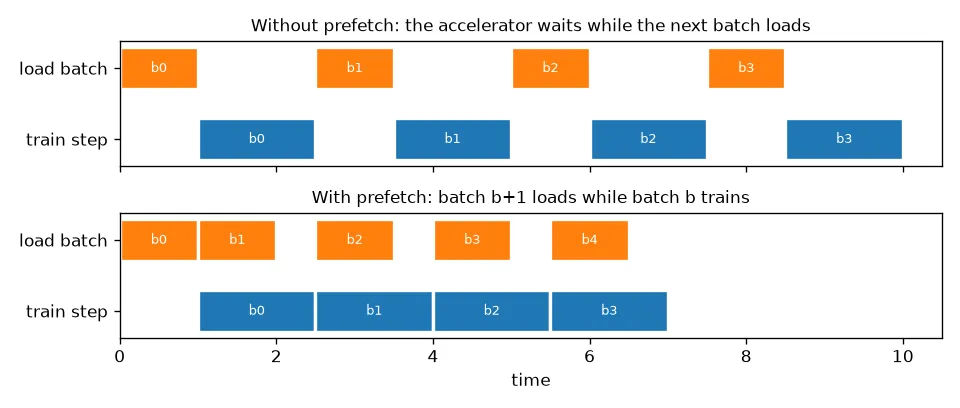
A small benchmark with a fake 10 ms “decode” and a fake 20 ms “training step” shows the difference:
import time

def slow_load(i):                      # stands in for reading and decoding one image: 10 ms
    return tf.py_function(lambda x: (time.sleep(0.01), x)[1], [i], tf.int64)

def run(ds, train_step_s=0.02):
    t = time.perf_counter()
    for _ in ds:
        time.sleep(train_step_s)       # stands in for one training step: 20 ms
    return time.perf_counter() - t

base = tf.data.Dataset.range(256)
naive = base.map(slow_load).batch(8)
fast = base.map(slow_load, num_parallel_calls=AUTOTUNE).batch(8).prefetch(AUTOTUNE)
print(f"naive: {run(naive):.2f} s, parallel map + prefetch: {run(fast):.2f} s")
# naive: 3.20 s, parallel map + prefetch: 0.79 s
The naive version pays ms s. The fast one gets close to the pure training time of ms s. Once loading is completely hidden, the model itself is the slow part, which is what you want.
Bug 1: a split that changes every epoch
My first segmentation pipeline listed the image files and then split them with take and skip:
files = tf.data.Dataset.from_tensor_slices([f"img_{i:02d}.jpg" for i in range(10)])
shuffled = files.shuffle(10, reshuffle_each_iteration=True)   # what list_files() does by default
train, val = shuffled.take(8), shuffled.skip(8)

seen_in_val = set()
for epoch in range(5):
    seen_in_val |= {v.decode() for v in val.as_numpy_iterator()}
print(len(seen_in_val), "different files appeared in 'validation' over 5 epochs")   # several, e.g. 4 to 7
This one was sneaky. Dataset.list_files shuffles by default, and it reshuffles every epoch. So take and skip grab a different subset each time, and after a few epochs the model has trained on every validation image. The validation score then looks much better than it really is. The fix is to make the order fixed (shuffle=False, or one shuffle with reshuffle_each_iteration=False), split, and only then shuffle the training part. Even better, split the file lists on disk before building any pipeline, and split by group when samples are related to each other (see grouped cross-validation).
Bug 2: interpolated masks
A segmentation mask holds class IDs, not brightness values. If you resize it like an image, you invent labels that don’t exist:
mask = tf.constant([[0, 0, 3, 3]] * 4, dtype=tf.float32)[..., None]   # labels 0 and 3 only
print(sorted(set(tf.image.resize(mask, [4, 8], method="bilinear").numpy().ravel())))
# [0.0, 0.75, 2.25, 3.0]   <- 0.75 and 2.25 are not classes
print(sorted(set(tf.image.resize(mask, [4, 8], method="nearest").numpy().ravel())))
# [0.0, 3.0]
After casting to integers, the edge between class 0 and class 3 gets a thin band of classes 0 to 2. So always resize masks, and apply geometric augmentation to them, with nearest-neighbour interpolation (just copy the closest pixel’s value). I had used the same decode_and_resize function for images and masks. The masks needed their own.
Bugs 3 and 4: augmentation that’s misaligned or not actually random
For segmentation and detection, every geometric change to the image (flip, crop, rotate) has to be applied in exactly the same way to the label. Colour changes go to the image only. The clean way to do this is a stateless random op with one shared seed per sample:
def augment_pair(image, mask):
    seed = tf.random.uniform([2], maxval=2**31 - 1, dtype=tf.int32)  # a TF op: new value per element
    image = tf.image.stateless_random_flip_left_right(image, seed)
    mask = tf.image.stateless_random_flip_left_right(mask, seed)     # same seed, same flip
    image = tf.image.stateless_random_brightness(image, 0.2, seed)  # colour: image only
    return image, mask
My first version made the seed with NumPy: seed = tf.constant([rng.integers(0, 100), ...]). That looks random, but Dataset.map traces the function into a graph once. Python and NumPy code only runs during that trace, so the seed turned into a constant and every sample got the same “random” flip:
import numpy as np
rng = np.random.default_rng()

def augment_wrong(x):
    seed = tf.constant([rng.integers(0, 100), rng.integers(0, 100)])   # runs once, at trace time
    return tf.image.stateless_random_flip_left_right(x, seed), seed

ds = tf.data.Dataset.from_tensors(tf.zeros([2, 2, 1])).repeat(4).map(augment_wrong)
print([tuple(s.numpy()) for _, s in ds])   # the same seed four times
The general rule I took from this: inside anything that gets traced into a graph (Dataset.map, tf.function, and in many cases torch.compile too), randomness has to come from the framework’s own random ops. Python-side randomness gets frozen at trace time.
The same ideas in PyTorch
PyTorch splits the job in two. A Dataset knows how to load sample , and a DataLoader handles shuffling, batching and parallel loading:
| tf.data | PyTorch |
|---|---|
map(load, num_parallel_calls=AUTOTUNE) | DataLoader(num_workers=k): worker processes call __getitem__ |
prefetch(n) | prefetch_factor batches per worker, ready in advance |
shuffle(buffer) | shuffle=True (a full permutation of indices each epoch) |
cache() | keep decoded tensors in the Dataset, or pre-decode to fast storage |
| — | pin_memory=True for faster host-to-GPU copies |
With the same fake 10 ms load and 20 ms step, four workers cut the time from 3.9 s to 2.4 s on my laptop. Most of what was left was the cost of starting worker processes on macOS, which persistent_workers=True pays only once instead of every epoch. Since PyTorch workers run normal Python, NumPy randomness does change per sample. Each worker needs its own seed, though, or older setups can give the same augmentations in every worker (see worker_init_fn in the docs).
Key takeaways
- Stream the data: list paths, decode in parallel, cache decoded samples, augment after the cache, batch, and prefetch.
- Prefetching overlaps loading with training. When it works, an epoch takes about as long as the compute alone.
- Split once, before any shuffling. A reshuffled source followed by
take/skipquietly leaks validation data into training. - Resize and warp masks with nearest-neighbour interpolation, and apply geometric augmentations to image and label with the same random parameters.
- In traced code, randomness has to come from framework ops. Python or NumPy random calls run once, at trace time.
Resources
- TensorFlow guide, “tf.data: Build TensorFlow input pipelines”: tensorflow.org/guide/data
- TensorFlow guide, “Better performance with the tf.data API” (prefetch, parallel map, cache ordering): tensorflow.org/guide/data_performance
- TensorFlow tutorial, “Data augmentation” (stateless random ops): tensorflow.org/tutorials/images/data_augmentation
- PyTorch docs,
torch.utils.data(workers, prefetch_factor, pin_memory, worker seeding): pytorch.org/docs/stable/data.html - Murray, Simsa, Klimovic, Indyk, “tf.data: Fast, Flexible, and Easy-to-Use Input Pipelines for Machine Learning”, VLDB 2021. arXiv:2101.12127
- Related notes: grouped cross-validation, photometric colour augmentation, tiling large images.