Computational graphs: how a formula becomes something you can differentiate
Any expression, even a neuron, can be written as a graph of values and operations, and that graph is what automatic differentiation runs on.
Every deep learning framework does the same trick. It writes down your calculation as a graph, then walks that graph backwards to get the gradients. Before I could understand backpropagation, I needed to see that graph clearly. So this note is about three things: what a derivative actually tells you, how a formula turns into a graph, and how to build and draw that graph with a few lines of Python.
What a derivative tells you
A derivative answers one simple question: if I push a tiny bit (by ), how much does move, compared to that push?
is just the size of the push. If you pick a small but real instead of taking the limit, you get a numerical estimate. That’s a handy way to check your gradients later.
def f(x):
    return 3*x**2 - 4*x + 5

h = 1e-6
x = -3.0
print((f(x + h) - f(x)) / h)   # about -22.0; exact: f'(x) = 6x - 4 = -22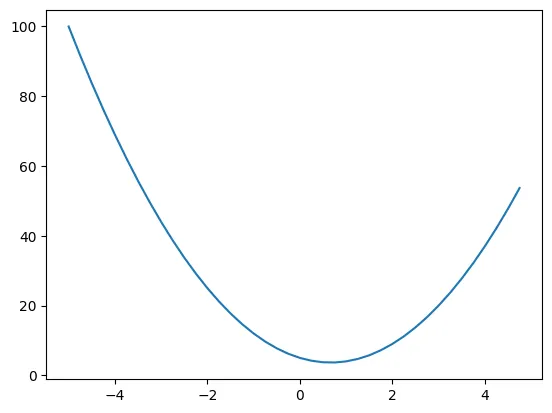
At the curve drops fast as grows, so the slope is big and negative. At the slope is zero. That’s the bottom of the curve.
It works the same with more than one input. Take and push one input at a time. That gives the partial derivatives (the slope with respect to one input while the others stay fixed): , and . The numbers agree: with , , the estimates come out at about 3, 2 and 1.
Turning a formula into a graph
A computational graph is just a diagram with arrows and two kinds of boxes:
- Value nodes hold numbers: inputs, parameters, in-between results and the output.
- Operation nodes (
+,*,tanh, …) take values in and spit out a new value.
The arrows (edges) show which values go into which operation. For , and go into +, then that result and go into *, and * gives . Numbers flow left to right. Later, gradients will flow right to left along the same arrows.
I first drew these graphs by hand with the graphviz package:
from graphviz import Digraph

g = Digraph(graph_attr={'rankdir': 'LR'})          # left-to-right layout
for name in ['x', 'y', 'w', 'z']:
    g.node(name, name)
g.node('add', '+', shape='circle')
g.node('mul', '*', shape='circle')
g.edges([('x', 'add'), ('y', 'add'), ('add', 'mul'), ('w', 'mul'), ('mul', 'z')])
g   # renders in a notebook
I also tried building the graph automatically by reading strings like "z = ((x + y) - (p + r)) * w" one character at a time. That’s fine for tiny examples, but it falls apart fast once you have nested brackets and operator order to deal with. Still, it taught me something: you don’t need a parser at all. If every operation remembers its own inputs while it runs, the graph builds itself.
Letting the code build the graph
The micrograd way is to wrap each number in a small Value object. The + and * operators are overloaded so they compute the result and also remember which values made it.
import math

class Value:
    def __init__(self, data, _children=(), _op='', label=''):
        self.data = data
        self._prev = set(_children)   # the values this one was computed from
        self._op = _op                # the operation that produced it
        self.label = label
        self.grad = 0.0               # filled in later by backpropagation

    def __add__(self, other):
        return Value(self.data + other.data, (self, other), '+')

    def __mul__(self, other):
        return Value(self.data * other.data, (self, other), '*')

    def tanh(self):
        return Value(math.tanh(self.data), (self,), 'tanh')
Now a normal-looking expression builds a graph on the side. Here’s a single neuron with two inputs, :
x1, x2 = Value(2.0, label='x1'), Value(0.0, label='x2')
w1, w2 = Value(-3.0, label='w1'), Value(1.0, label='w2')
b = Value(6.8813735870195432, label='b')
n = x1*w1 + x2*w2 + b
o = n.tanh()
print(o.data)   # 0.7071...
The weird bias value is picked on purpose: it makes and , so the numbers come out nice later.
Walking the graph
To draw or process the graph, start at the output and keep following the _prev links, collecting nodes and edges as you go:
def trace(root):
    nodes, edges = set(), set()
    def build(v):
        if v not in nodes:
            nodes.add(v)
            for child in v._prev:
                edges.add((child, v))
                build(child)
    build(root)
    return nodes, edges
Give these sets to graphviz (one box per value showing its label, data and grad, plus a small node for each operation) and you get the picture below.

All the grad fields are still zero. Filling them in is what backpropagation does, and that’s the next note: backpropagation with micrograd. The thing to notice here is that the graph already has everything we need. Each node knows its inputs and the operation that combined them, and each operation has a simple local derivative.
Key takeaways
- A derivative tells you how much the output moves when you nudge one input a little. A finite-difference estimate is a good quick check.
- A computational graph breaks a formula into value nodes and operation nodes, connected by arrows.
- You don’t need to parse formulas. If each operation remembers its inputs, just running the code builds the graph.
- Walking back from the output through the stored inputs gives you the whole graph. That’s the starting point for automatic differentiation.
Resources
- Andrej Karpathy, “The spelled-out intro to neural networks and backpropagation: building micrograd”, Neural Networks: Zero to Hero (video): https://www.youtube.com/watch?v=VMj-3S1tku0. The
Valueclass,tracefunction and the neuron example are adapted from this lecture. - Andrej Karpathy, micrograd (repository): https://github.com/karpathy/micrograd
- Graphviz Python package documentation: https://graphviz.readthedocs.io/