Parallel Python: threads, processes, asyncio and the GIL
When threads, processes or asyncio actually make Python code faster, why a process pool can be slower than a plain loop, and how map-reduce sits on top of Pool.map.
My first try at parallel Python went backwards. I pushed a tiny function through a process pool, expecting it to fly, and it ran much slower than a plain for loop. That made me stop and look properly. Python gives you three ways to do several things at once: threads, processes and asyncio. Pick the wrong one and you get no speed-up at all, or the code even gets slower. These notes are me working out why, and ending up with a simple rule for choosing.
Two kinds of slow code
The question that cleared things up for me was simple: what is the program actually waiting for?
- CPU-bound code spends its time computing: parsing, number loops, image processing in pure Python. It only gets faster if more CPU cores work on it.
- I/O-bound code spends its time waiting: for a web server, a disk, a database or a queue. The CPU just sits there during the wait. It gets faster if other work can happen during the wait. More cores don’t help.
The GIL
This was the part that surprised me most. CPython, the normal Python interpreter, has a Global Interpreter Lock (GIL). Only the thread holding the lock can run Python bytecode. So in a normal CPython build, two threads never run Python code at the same moment, even on an 8-core machine. Think of one microphone passed around a room: lots of people, but only one talks at a time.
The GIL is let go while a thread waits for I/O (time.sleep, reading a socket, reading a file) and inside many C extensions (NumPy, OpenCV and similar libraries release it during heavy loops). That’s why threads still help with I/O, and with code that spends most of its time inside those libraries.
Since Python 3.13 there’s also a free-threaded build (PEP 703, installed as python3.13t, python3.14t and so on) where the GIL is turned off. It was experimental in 3.13. Since 3.14 it’s officially supported (PEP 779), but it’s still an optional, separate build, not the default, and some extension packages don’t support it yet. Everything below is about the normal build, which still has the GIL.
The three tools
| Tool | What runs in parallel | Good for | Cost |
|---|---|---|---|
threading / ThreadPoolExecutor | Threads in one process, sharing memory; Python code takes turns because of the GIL | I/O-bound work, calls into C code that releases the GIL | Cheap to start; shared state needs locks |
multiprocessing / ProcessPoolExecutor | Separate interpreters, each with its own GIL, on separate cores | CPU-bound pure-Python work | Process start-up; every argument and result is pickled and sent between processes |
asyncio | One thread; tasks hand over control at each await | Many concurrent I/O waits (thousands of connections) | Every library in the chain must be async |
Trying it on my laptop
I ran the same cases on an 8-core machine with Python 3.13: a CPU-bound task (count primes below 60,000, 16 times) and an I/O-bound task (50 waits of 0.1 s each).
import time, math, asyncio
from concurrent.futures import ThreadPoolExecutor, ProcessPoolExecutor

def count_primes(n):          # CPU-bound: pure Python arithmetic
    return sum(all(k % d for d in range(2, math.isqrt(k) + 1)) for k in range(2, n))

def fake_io(_):               # I/O-bound: just waits
    time.sleep(0.1)

async def fake_io_async(_):
    await asyncio.sleep(0.1)

if __name__ == "__main__":    # needed for process pools: with "spawn" (macOS, Windows) and
                              # "forkserver" (Linux default since 3.14) workers re-import this file
    jobs = [60_000] * 16
    with ThreadPoolExecutor(8) as ex:  list(ex.map(count_primes, jobs))   # ~1.25 s
    with ProcessPoolExecutor(8) as ex: list(ex.map(count_primes, jobs))   # ~0.33 s
    with ThreadPoolExecutor(50) as ex: list(ex.map(fake_io, range(50)))   # ~0.10 s
    async def main(): await asyncio.gather(*(fake_io_async(i) for i in range(50)))
    asyncio.run(main())                                                    # ~0.10 s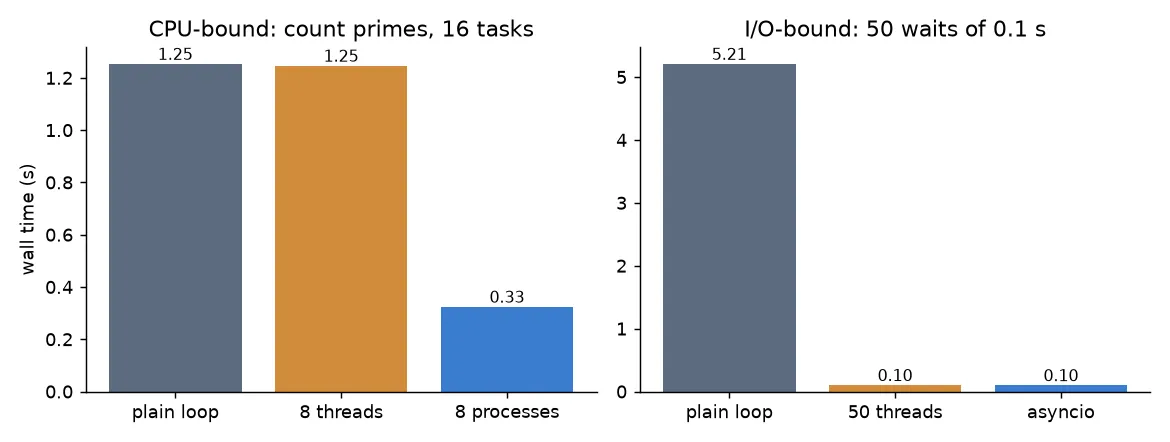
The results line up with the theory:
- For the CPU-bound task, threads gave no speed-up at all (1.25 s, same as the loop), because of the GIL. Processes were about 3.9× faster on 8 cores. Not 8×, because of start-up time, pickling, and because the cores on this machine aren’t all the same.
- For the I/O-bound task, the loop took 5.2 s (50 × 0.1 s). Threads and asyncio both overlapped the waits and finished in about 0.1 s. Processes would work here too, but they’re the most expensive tool for this job.
Why my process pool was slower than a loop
My original benchmark looked like this:
from multiprocessing import Pool

def multiplier(coef=3):
    return coef * 2

if __name__ == "__main__":
    with Pool() as p:
        result = p.map(multiplier, range(100_000))
The loop version took about 0.007 s. The pool version took about 0.14 s, twenty times slower. Why? The work for each item is one multiplication, a few nanoseconds. But for each item the pool has to pickle (serialize) the argument, send it through a pipe to a worker process, unpickle it, run the function, and send the result back the same way. That overhead is far bigger than the work itself. On top of that, starting the worker processes costs tens of milliseconds.
Two things control this overhead:
chunksize.Pool.mapsends items to workers in chunks. Withchunksize=1, every item is its own message: mapping 200,000 trivial items took 5.2 s on my machine. With the default (the pool splits the input into about four chunks per worker), one million items took 0.06 s, about the same as the loop (0.08 s). Bigger chunks mean fewer messages.- Task size. Parallel code only pays off when each task does much more work than it costs to send. So make tasks chunky: give each worker a whole file, a whole image tile or a block of rows, not a single number. And don’t send big objects as arguments. Send a path or an index and let the worker load the data itself.
Libraries like joblib (with the loky backend) and mpire add progress bars, nicer error messages and worker reuse, but they pay the same overhead. They don’t change the rule.
Map-reduce on top of Pool.map
Once the overhead made sense, the next question was how to shape bigger jobs. Map-reduce is a way to shape a computation so that most of it can run in parallel. It has three steps:
- Map: turn each input record into
(key, value)pairs, each one on its own. - Shuffle: group together all values that share a key.
- Reduce: combine the values for each key into one result, again each key on its own.
Map and reduce are “embarrassingly parallel” (no piece needs any other piece), so they can use Pool.map. The shuffle has to see all the pairs, so here it stays in the main process. Here’s the classic word count, written as a small function that runs either in a plain loop or with a pool:
from collections import defaultdict
from multiprocessing import Pool

def mapper(word):                 # map: one record -> (key, value)
    return word.lower(), 1

def reducer(item):                # reduce: (key, [values]) -> (key, result)
    key, values = item
    return key, sum(values)

def map_reduce(records, mapper, reducer, pool=None):
    run = pool.map if pool else map
    shuffled = defaultdict(list)          # shuffle: group values by key
    for key, value in run(mapper, records):
        shuffled[key].append(value)
    return dict(run(reducer, shuffled.items()))

if __name__ == "__main__":
    words = "Python is great Python rocks".split()
    with Pool(4) as pool:
        print(map_reduce(words, mapper, reducer, pool))
        # {'python': 2, 'is': 1, 'great': 1, 'rocks': 1}
For five words the pool is pure overhead, for the reasons above. The point of the pattern is that the same mapper and reducer scale up: tools like Hadoop, Spark and Dask run the map and reduce steps on many machines and do the shuffle over the network. One small gotcha: mapper and reducer are named functions, not lambdas. Anything you send to a process pool has to be picklable, and lambdas aren’t.
A simple rule for choosing
- Measure first (see profiling Python code). Maybe the slow part can be vectorized with NumPy, which is often a bigger win than any pool.
- Waiting on I/O? Use threads (
ThreadPoolExecutor). If you need thousands of connections at once and your libraries are async, use asyncio. - Pure-Python CPU work? Use processes (
ProcessPoolExecutorormultiprocessing.Pool) with chunky tasks and a sensiblechunksize. - Heavy work inside NumPy or another C library that releases the GIL? Threads may be enough, and they avoid copying data between processes.
Key takeaways
- First figure out if the code is CPU-bound or I/O-bound. That decides the tool.
- In normal CPython, the GIL stops threads from running Python code in parallel, so threads don’t speed up pure-Python computation. Free-threaded builds (3.13+, officially supported since 3.14) remove the GIL, but they’re still optional, not the default.
- Process pools pay for start-up and for pickling every argument and result. Tiny tasks or
chunksize=1can make them much slower than a loop. - Threads and asyncio both overlap waiting. asyncio scales to more tasks at once but needs async libraries.
- Map-reduce splits work into independent map and reduce steps that a pool (or a cluster) can run in parallel, with a shuffle in between.
Resources
- Tiago Rodrigues Antão, Fast Python: High Performance Techniques for Large Datasets, Manning, 2023, chapter 3 (the naive map-reduce word count is adapted from there). https://www.manning.com/books/fast-python
- Python documentation:
multiprocessing(includingPool.mapandchunksize),concurrent.futures,asyncio. https://docs.python.org/3/library/concurrency.html - Sam Gross, PEP 703: Making the Global Interpreter Lock Optional in CPython. https://peps.python.org/pep-0703/
- PEP 779: Criteria for supported status for free-threaded Python (accepted for 3.14). https://peps.python.org/pep-0779/
- Python docs, “Free-threaded CPython” HOWTO. https://docs.python.org/3/howto/free-threading-python.html
- Jeffrey Dean and Sanjay Ghemawat, “MapReduce: Simplified Data Processing on Large Clusters”, OSDI 2004.